A time-based menu for cafés: breakfast in the morning, the grill at night
Cupcloud's time-based menu lets a café, cafeteria or restaurant in the UAE sell items only at the hours it serves them, such as breakfast from 6 to 11 or a grill from 6 PM. Outside its serving time an item stays on the menu, greyed, with the time it is back, and it cannot be ordered from the customer's phone or the counter. Staff can start a serving time early or extend it for today.
Breakfast finishes at eleven, but the QR menu does not know that. A customer orders a foul plate at two in the afternoon, the kitchen has already cleaned the pot, and someone has to call the customer and apologise. Serving times put your kitchen's real hours into the menu itself, so customers and staff can only order what you are actually making right now.
Why a menu needs hours of its own
Most cafés do not serve everything all day. Breakfast plates and fresh juice in the morning, a lunch special at midday, shawarma and grills after Maghrib, while karak and coffee run from opening to closing. A paper menu handles this with a line at the bottom; a digital menu that takes orders needs a real rule.
Without one, staff spend the day refusing orders that should never have been placed, and customers who ordered in good faith are let down.
Set a serving time once
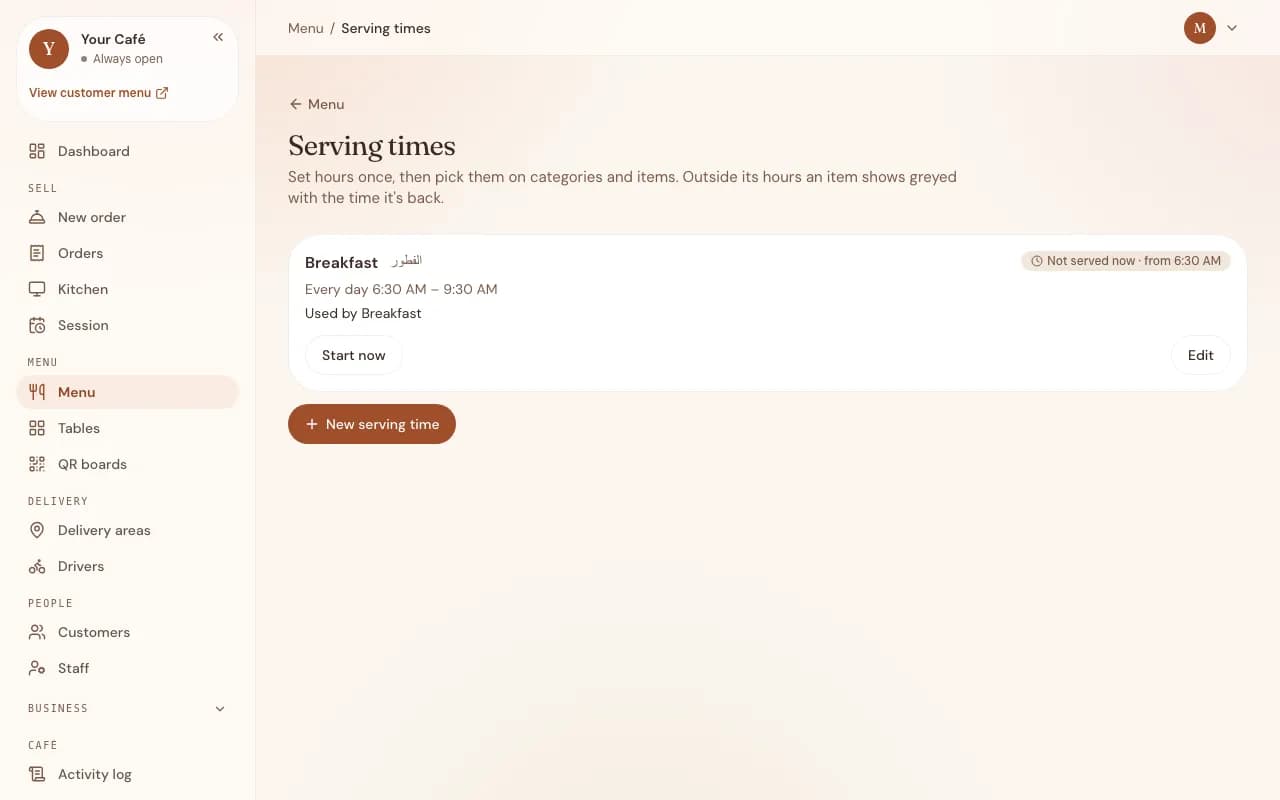
In Menu, open Serving times and create a named schedule: "Breakfast" every day 6:00 to 11:00, "Evening" 6:00 PM to 11:00 PM, Thursday until 2:00 AM. Each serving time can have up to three ranges a day, a different time on some days, days when it is not served, and overnight ranges that end the next day.
Each serving time shows its state today, such as "Served now until 11:00 PM" or "Not served now, from 6:00 PM", which categories and items use it, and who last extended it.
Per category or per item
A category follows a serving time or is Always available. Put the Breakfast category on Breakfast and every item in it follows. An item can also choose its own: same as its category, a different serving time, or Always.
The item's own choice wins. So the Breakfast category can stay on Breakfast while the plain croissant in it is set to Always and sells all day. The menu editor shows a small clock chip on each category and item so you can see the rule at a glance.
What customers see
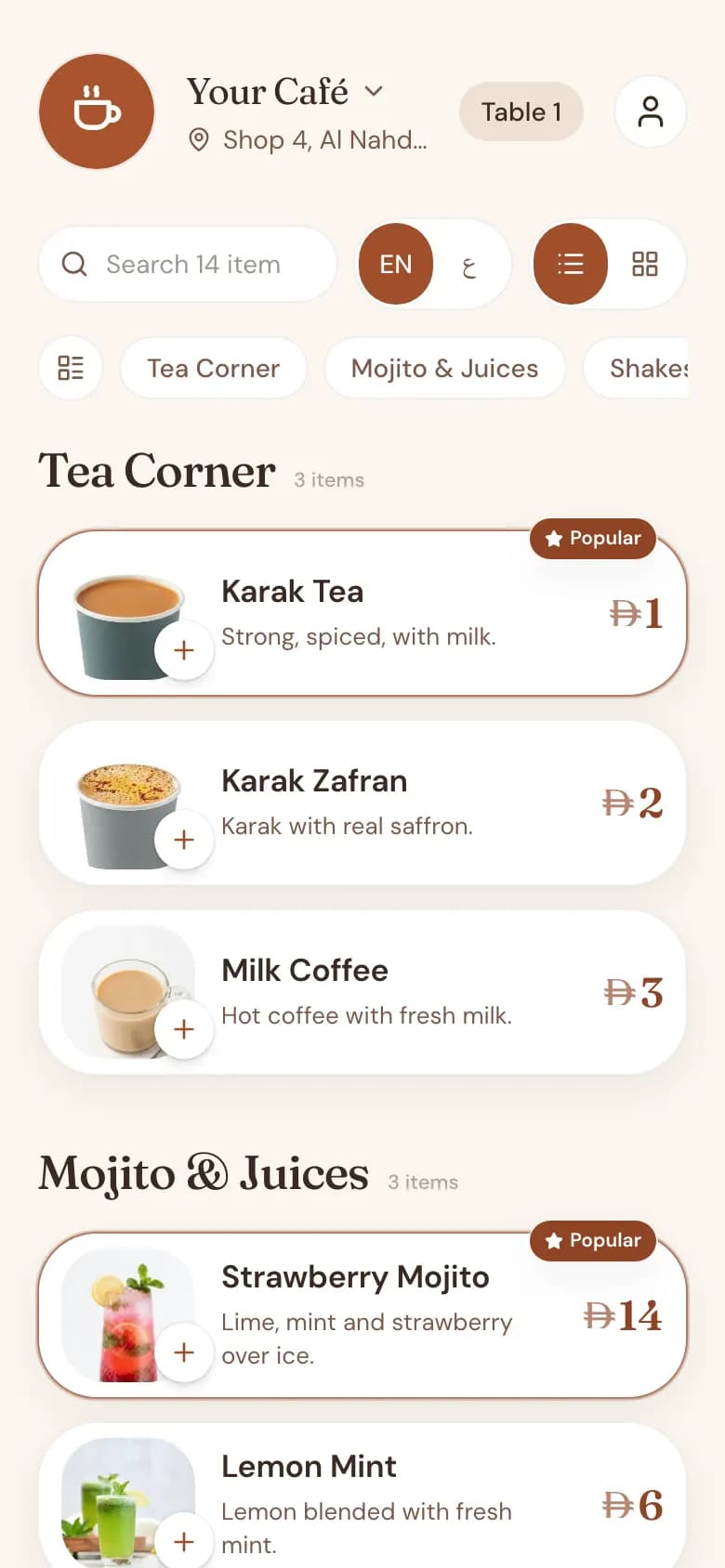
Outside its serving time an item stays on your menu, greyed, with the time it is back: "From 6:00 PM", "Tomorrow 7:00 AM" or "Fri 6:00 PM", in English or Arabic. It cannot be added to the cart. The category line says when it is served today, and the item's own page shows its serving hours.
Customers see only the time, never the name you gave the serving time. If a cart was filled just before breakfast ended, checkout names the item and its time and offers Remove and continue, so the rest of the order still goes through.
The counter follows the same rule, with Start now and Extend
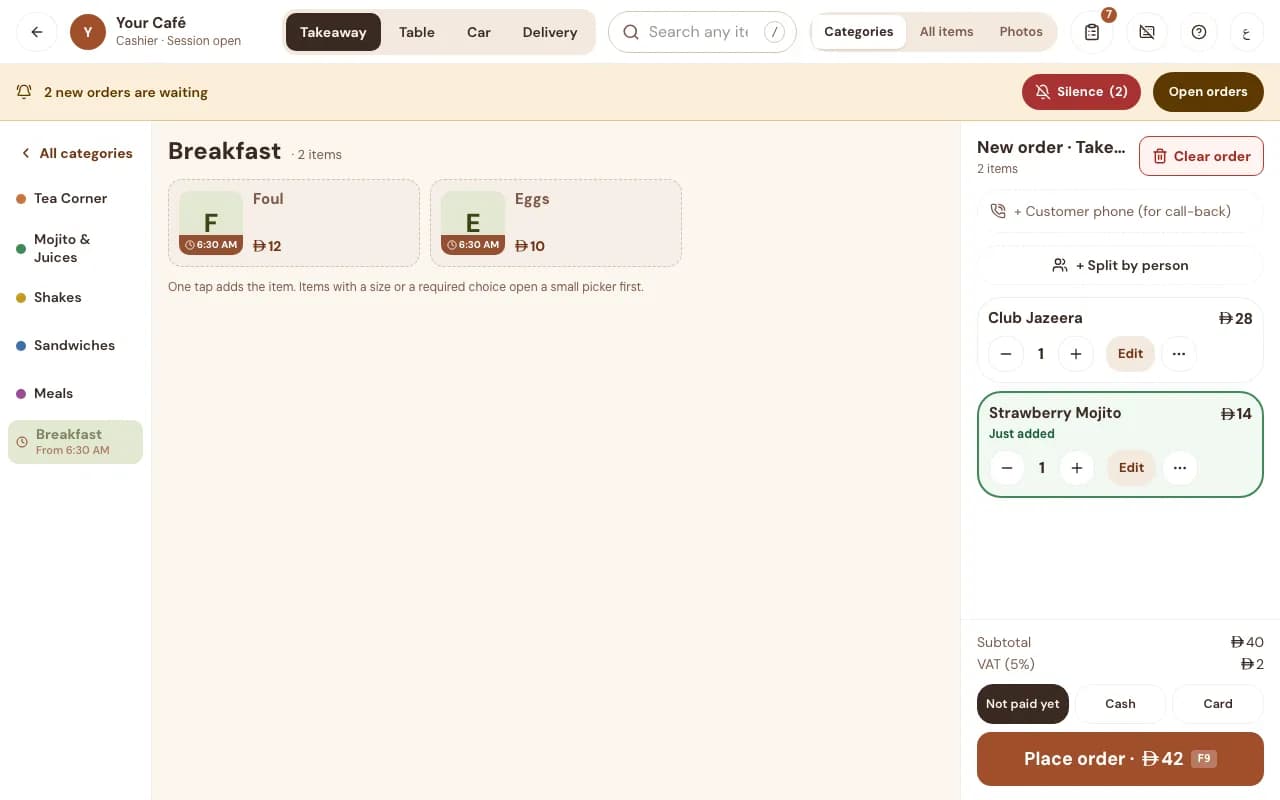
On the staff order screen, an item outside its time is a greyed tile with a clock tag; search still finds it, and a tap explains when it is served. The wording follows the screen's language, English or Arabic.
Real days do not follow a schedule exactly. A manager or cashier can tap Start now to open a serving time early for today, or Extend it by 30 minutes, an hour or until closing. About fifteen minutes before a serving time ends, the order screen shows a bar with the time left and the Extend buttons. Every start and extend is for today only, with Undo; tomorrow runs on the normal schedule. A waiter sees the same bar with a note to ask a manager or cashier.
Refused on every path, capped by your opening hours
The rule is checked on the server, not only on the screen. A timed item outside its time is refused at the customer's checkout, on the staff order screen and when an item is added while editing an order. Lines already on an order are left as they are.
Your opening hours always come first. When the café is closed, nothing timed is sold, and an extension never runs past closing time. Sold-out items stay sold out whatever the time. If you take pre-orders while closed, only Always items can be pre-ordered.
Every change is in the activity log
Each Start now, Extend and Undo is recorded with who did it and when, as is every edit to a serving time. Editing the schedules themselves is for managers only; cashiers can start and extend for the day but cannot change the plan.
So when the owner asks why breakfast was still selling at noon, the answer is one look away.
Common questions
How do I set a breakfast menu schedule?
Create a Breakfast serving time with its hours under Menu, Serving times, then set the Breakfast category to follow it. Every item in the category is sold only in those hours unless you set an item to Always.
Are items hidden outside their serving time?
No. They stay on the menu, greyed, with the time they are back, so customers know when to come. They cannot be ordered until then.
Can a serving time run past midnight?
Yes. A range can end the next day, for example 6:00 PM to 2:00 AM on Thursdays, but never past your café's closing time.
Can my cashier extend breakfast for one day?
Yes. A manager or cashier can extend a serving time or start it early for today, with Undo. Tomorrow goes back to the normal schedule, and every change is in the activity log.
Can serving times change prices, like a happy hour?
No. Serving times decide when an item can be sold, not its price. The Serving times page is in English for now; the customer menu and the order screen are in English and Arabic.
How do I start, and what does it cost?
Sign up online for a 14-day free trial, no card needed, or message us on WhatsApp and our team will set it up with you. Pricing after the trial is on request, with no commission on orders.