A split bill POS for UAE cafés: card and cash on one bill, by person, and online
Cupcloud is a split bill POS for cafés and restaurants in the UAE: one bill can be paid part by card and part in cash, and an order can be split by person with each part paid on its own. It also records counter refunds and takes online card payments through the café's own gateway account, with the money going straight to the café and no commission.
Three friends at a table, one pays 50 in cash and puts the rest on a card, the other two want to pay for their own. On most tills somebody ends up doing sums on a receipt and the day's cash and card totals are wrong by the evening. Cupcloud records each payment the way it was really made, so the bill, the drawer and the Z report agree.
One payment dialog for every counter payment
Whenever money is taken at the counter, the cashier sees the same payment dialog: the amount due in large figures, and a choice of cash or card. For cash, they tap Exact, a quick amount or the note the customer handed over on the keypad, and Cupcloud works out the change before anyone opens the drawer. If the note is too small, it says how much is short.
Card means the café's own card machine from your bank. The cashier charges the card on the machine as usual and records it in Cupcloud with one tap. Cupcloud has no built-in card terminal and never touches the card, but every card payment lands in the day's figures. The printed bill can show the cash received and the change.
Part card, part cash on one bill
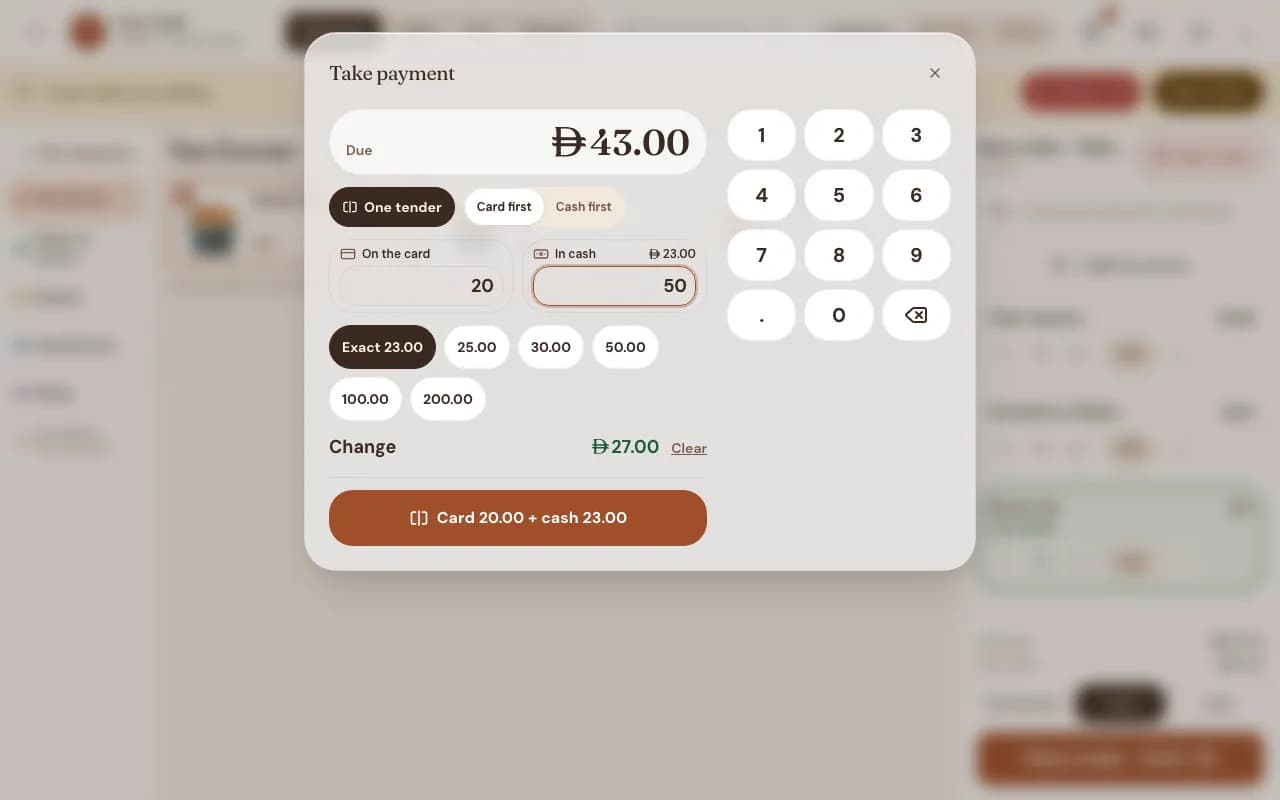
A customer owes 85 dirhams, hands over a 50 note and pays the rest by card. In the payment dialog the cashier taps Split payment, chooses card first or cash first, and types the first amount. Cupcloud fills in the rest, takes the note for the cash part and shows the change. The bill is paid only when card and cash add up exactly to what is due.
Each part of the payment is kept as its own line, so the 50 counts as cash and the 35 as card, both on the order and on the day's report. The printed bill lists the card line and the cash line separately.
Split by person, each part paid on its own
On the order screen a table's order can be split by person. Each part gets its own name, its own items, its own total with VAT and its own payment, so Ahmed can pay his part by card while his friend pays cash. One part can even be paid part card, part cash.
The order is paid only when every part is paid. The kitchen still gets one ticket, with each item tagged with the part it belongs to, so food reaches the right person.
- Name each part, for example by person or seat
- Pay the parts at different times and with different tenders
- A paid part is locked while the rest of the table is still paying
- Online payments always cover the whole order and are never split
Who takes payment, and why a paid total stays put
Only a cashier or a manager can take payment; Cupcloud checks the role on the server, not just on the screen. Once an order is paid, its total is frozen, so nobody can add or remove items and leave the money and the bill out of step.
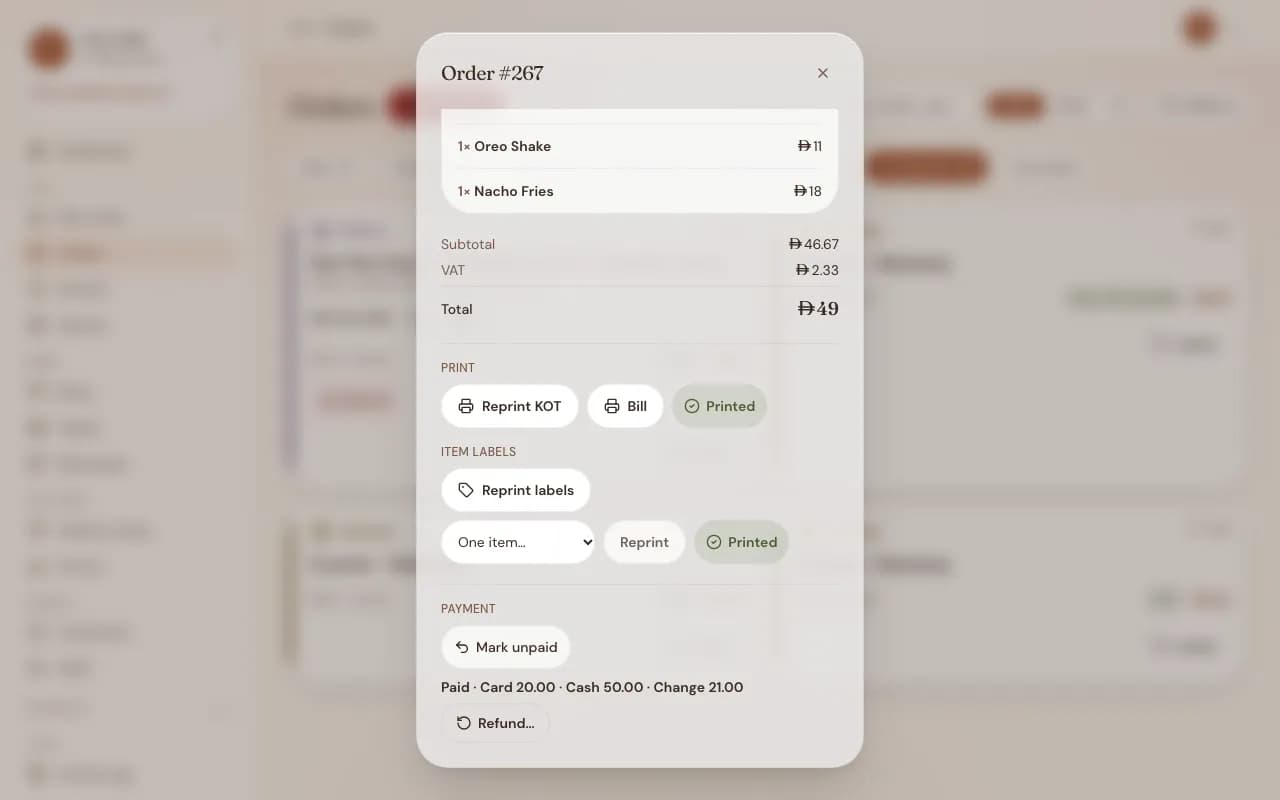
If a payment was recorded by mistake, a manager can mark it unpaid with a reason, and only then can the order be changed or cancelled. The order detail shows each tender that was taken and whether the bill has printed.
Counter refunds, by the manager, with a reason
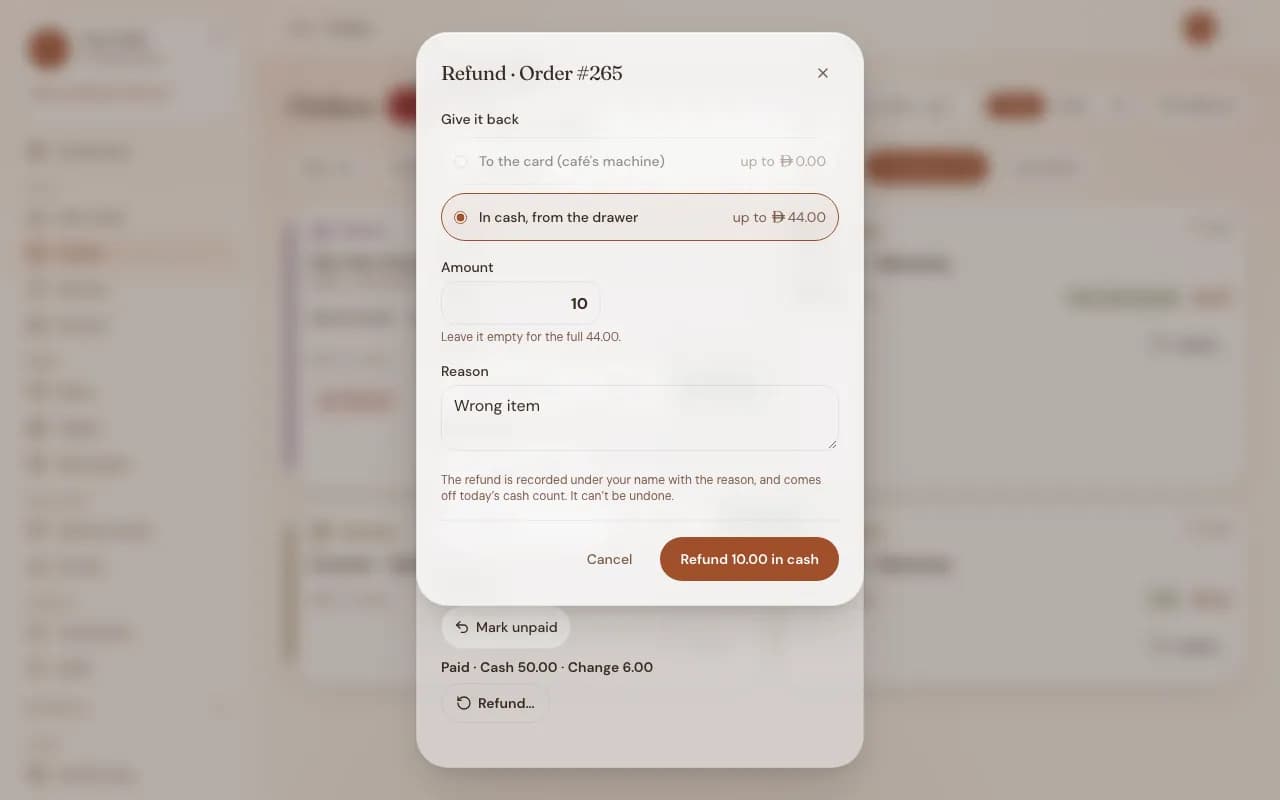
When a customer brings back a wrong item, a manager opens the order and refunds it. They choose the whole order or one paid part of a split order, choose whether the money goes back to the card on the café's machine or in cash from the drawer, and enter the amount: the full payment or part of it. A reason is required.
Cupcloud never lets a refund be more than that tender took on that order, so a card payment of 35 can never become a 50 cash refund. The refund is recorded under the manager's name with the reason, shown on the order, and comes off that day's cash count or card total. A fully refunded order shows as refunded, and an order with a refund can never be marked unpaid. Cashiers and waiters cannot refund.
Online card payments through your own gateway
Customers can pay by card when they order from the car, for delivery or for pickup, and at the table if you turn it on. The payment goes through your café's own payment gateway account, so the money goes straight to your account. Cupcloud is never the merchant, holds no money, collects no bank details and takes no commission on any order.
A manager can connect PayTabs themselves in Settings and check it with Test connection. N-Genius by Network International, Ziina, Mamo, Tap, Stripe, Checkout.com and Telr are set up with our team. An order is marked paid only when the gateway confirms the exact amount. If an online order needs money back, a manager refunds it from the order detail, never more than what is left.
How every payment shows on the X and Z report
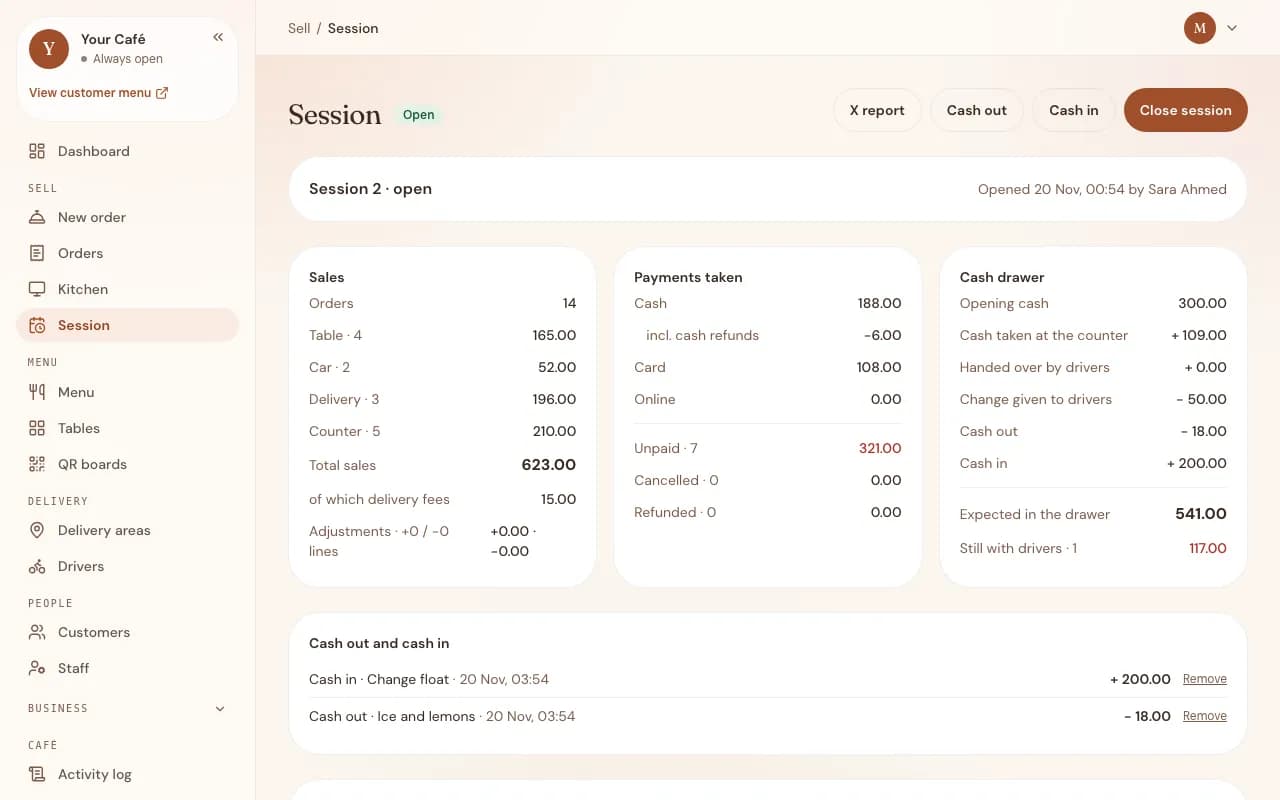
The session report keeps the three kinds of money apart: cash, card and online, with online split by gateway. A split payment is counted per tender, so the cash part goes into the cash line and the expected drawer, and the card part goes into the card line.
Refunds come off the tender they went back on, in the session they were made. A cash refund taken from the drawer at 9 pm lowers that evening's expected cash, even if the sale was yesterday. Online money is never in the cash count, so the drawer only has to match what really went into it.
Common questions
Can a customer pay part by card and part in cash?
Yes. In the payment dialog choose Split payment, enter the card or cash amount first and Cupcloud fills in the rest and works out the change. The bill is paid when both add up exactly.
Can each person at a table pay separately?
Yes. Split the order by person on the order screen; each part has its own items, total and payment, and the order is paid when every part is.
Which payment gateways in the UAE work with Cupcloud?
You can connect PayTabs yourself. N-Genius, Ziina, Mamo, Tap, Stripe, Checkout.com and Telr are set up with our team. Each uses your own account, so the money goes straight to you.
Does Cupcloud hold my money or take a commission?
No. Cupcloud is never the merchant of record, holds no money, collects no bank details and takes no commission per order.
Can a cashier give a refund?
No. Counter refunds are for managers only, with a reason, and never more than the tender took. Cashiers and managers can take payments.
Is there a built-in card machine or a printed refund slip?
No. Card payments at the counter are taken on your own card machine and recorded in Cupcloud. A counter refund is recorded on the order and the day's report but does not print a slip.
How do I start, and what does it cost?
Sign up online for a 14-day free trial with no card needed, or message us on WhatsApp and our team will set up your café with you. Pricing after the trial is on request, with no commission per order.