Restaurant back office software for UAE cafés, next to the till you already use
Cupcloud's back office is the manager-only part of the café system where a UAE café records supplier bills and payments, expenses, rent and fixed costs with cheque schedules, and staff advances and monthly payroll. It sits in the same system as the counter POS and the day close, so the profit and loss and VAT summary reports are built from your real sales and your real costs.
Most cafés run the money side from a drawer of supplier bills, a notebook of advances and a spreadsheet someone updates once a month. The sales are in one place and the costs are somewhere else, so nobody can say what last month actually left. Cupcloud puts the costs beside the sales, in plain screens a manager can fill in on a phone between rushes.
For the manager only, by design
Back office is switched on per café, and once it is on only a manager sees it. A cashier, waiter or driver does not see the Business section in the menu, cannot open its pages and cannot read its records, including salaries. That is checked on the screen, in every action and in the database itself.
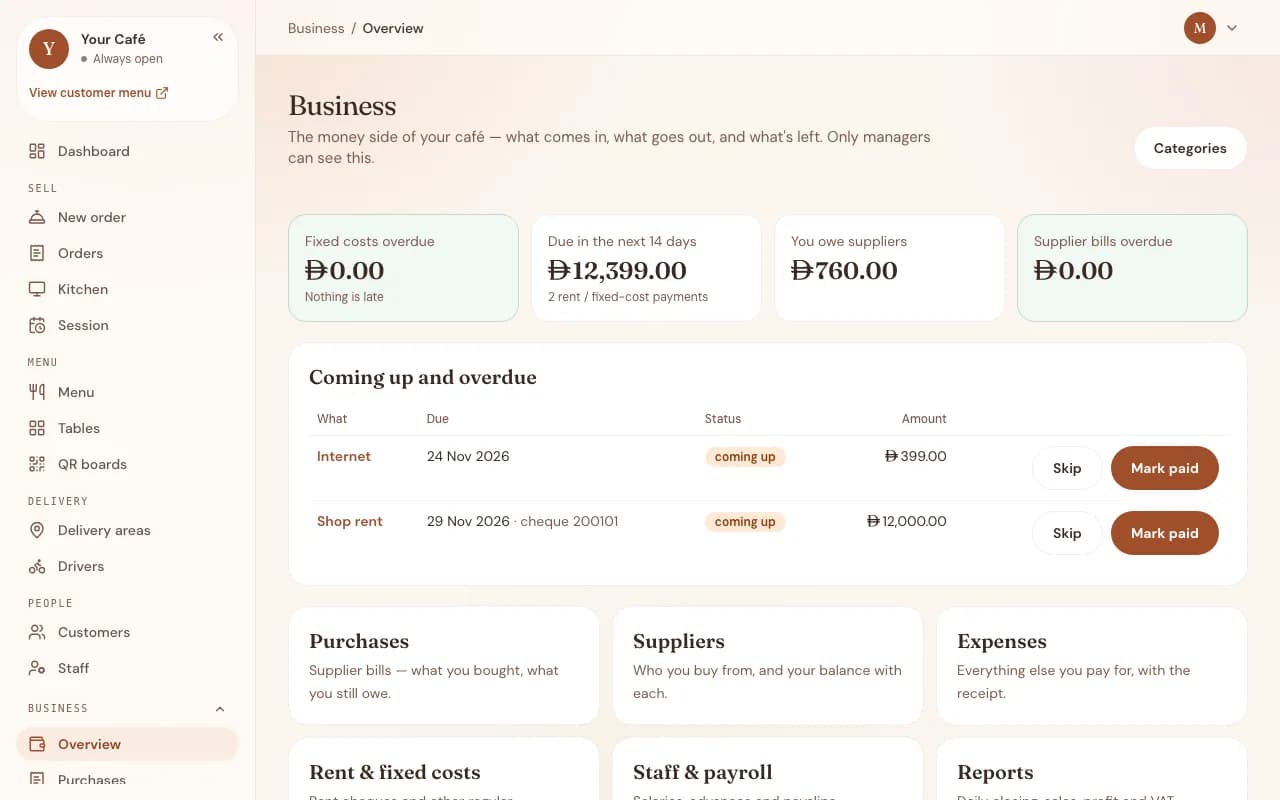
Everything is grouped under one Business section: an overview, purchases, suppliers, expenses, rent and fixed costs, staff and payroll, and the reports. Costs are sorted into categories you control. Each café starts with a ready set, such as food stock, gas, rent, utilities and salaries, which you can rename and add to.
Supplier bills, payments, and what you still owe
Add each supplier once, with a phone number, TRN and notes. When a bill arrives, record the date, number, category, VAT on the bill, the total and the date it must be paid by, and take a photo of the paper. If you want detail, add lines with quantity and price and the total is worked out for you.
When you pay a supplier, record the amount and how it was paid: cash, card, bank transfer or cheque with its number and date. A payment settles the oldest bills first unless you choose otherwise, and paying more than is owed is refused. Each supplier's page shows what you owe and what is overdue, so the question "did we pay the dairy this month?" has an answer in one tap.
- Bill status worked out from the payments: not paid, part paid or paid
- An Overdue view for bills past their pay-by date
- Bill and receipt photos kept private to the café's managers
- "I paid this bill in full already" records the bill and its payment together
Expenses, rent and post-dated cheques
Everyday spending goes in as an expense: the date, category, amount, the VAT on it, who it was paid to and how, with a receipt photo if you have one. Filter by month or category to see where the money went.
Rent and other fixed costs are set up once with their schedule. Choose the same amount every month, every three months or every year, or enter a list of post-dated cheques with each cheque number, date and amount, the way UAE rent is usually paid. Cupcloud shows each payment as coming up, overdue, paid or skipped, and the overview lists what falls due in the next 14 days. Marking one paid opens the expense form already filled in.
Staff profiles, advances and monthly payroll
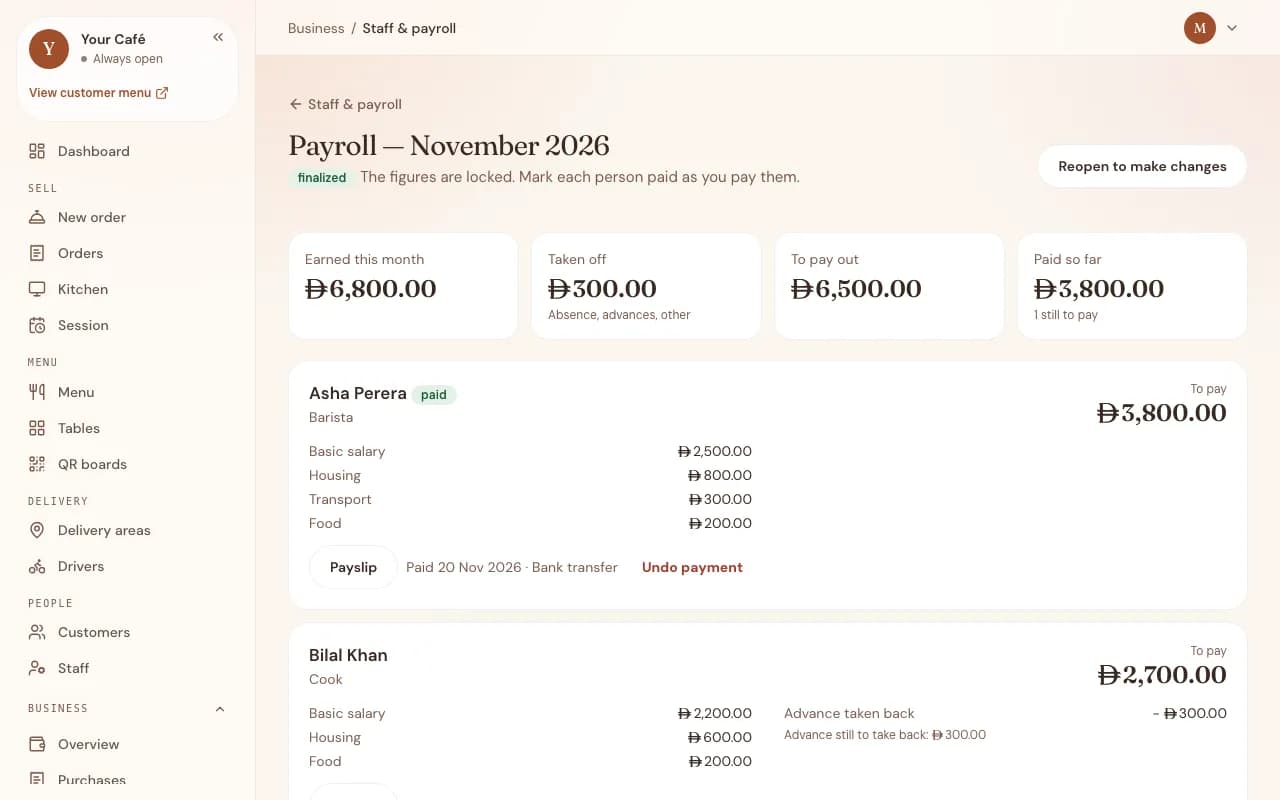
Each staff member gets a profile with their job, joining date, basic salary and housing, transport and food allowances, and how they are usually paid. Record a salary advance with how it will be taken back: all at the next payroll, or a fixed amount each month. The outstanding balance per person is always worked out for you.
At the end of the month, open the month's payroll. Each person's line starts from their profile with the advance recovery already filled in; add overtime, a bonus or an absence deduction with a note, and the net pay is calculated by the server. Finalize locks the month. Mark each person paid when the money goes out, and a printable payslip with your café's name and logo is ready for them.
Voided, never deleted: an audit trail you can trust
A money record in the back office is never deleted. If a bill, payment or expense was entered by mistake, the manager voids it with a reason. The record stays on the list, greyed out, with who voided it and why, and it no longer counts in any total.
Every create, edit, void, finalize and reopen is written to the café's activity log. A finalized payroll month can only be reopened with a reason, and lines already paid stay locked. When the owner asks why last month's figure changed, the answer is on the screen.
How it feeds profit and loss and the VAT summary
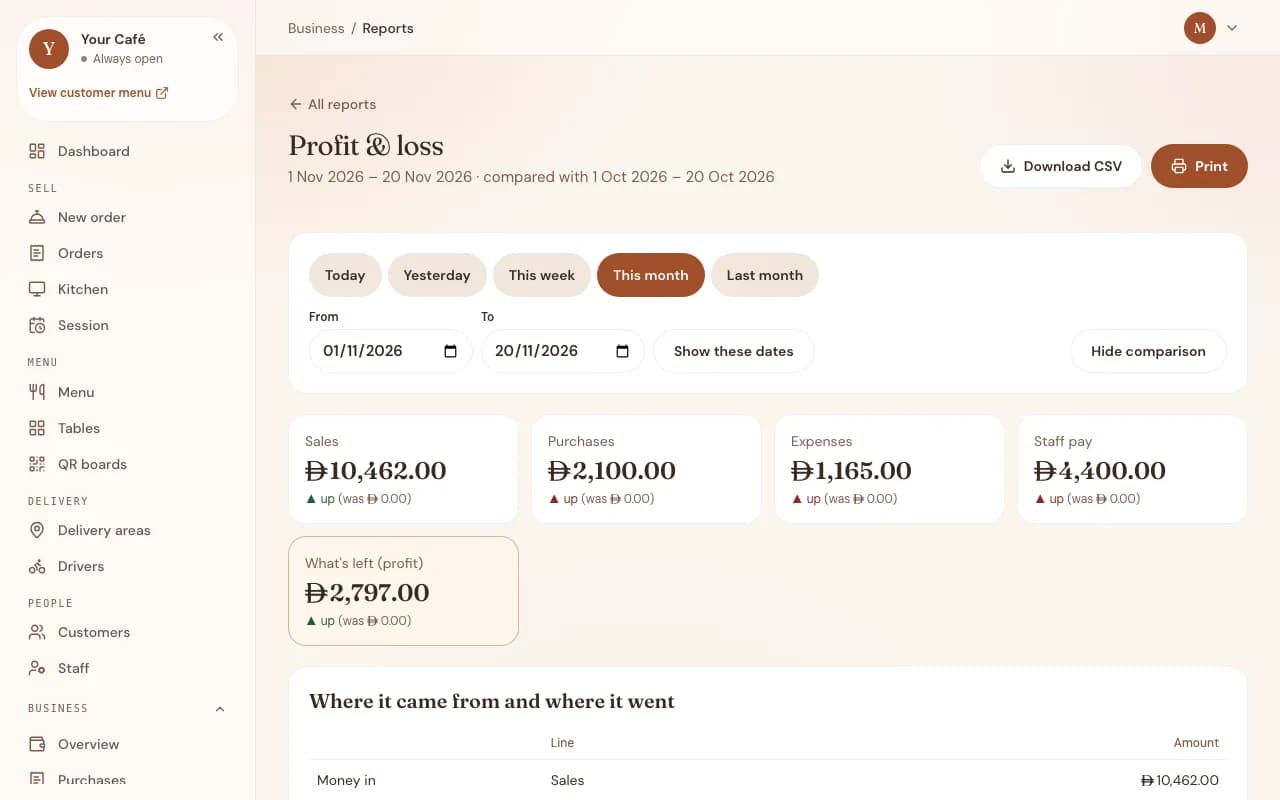
Because the costs live in the same system as the till, the reports can join them. The profit and loss report takes your sales, then subtracts purchases, expenses and staff pay, line by line and month by month. The VAT summary takes the VAT on your sales and subtracts the VAT on purchases and expenses you recorded, which is the figure your accountant needs, once your TRN is entered.
A simple example: a karak cafeteria records its milk and tea supplier bills as they arrive, its electricity as an expense, its rent as four post-dated cheques and its two staff on payroll. At the end of the month the profit and loss report shows sales from the POS against every one of those costs, without anyone copying numbers between files.
What the back office does not do
It is a record of what you spend and owe, not a stock system. There is no inventory or recipe stock: selling a karak does not deduct milk, and purchase bills record spend, not stock levels. It does not connect to accounting software such as Xero, QuickBooks or Zoho; the reports export as CSV for your accountant. Payroll does not produce a WPS salary file, end-of-service gratuity or leave records.
For most small cafés, cafeterias and restaurants that is the part they were missing: costs, cheques and salaries in one place, beside the sales they already ring up.
Common questions
Can my cashier see staff salaries in the back office?
No. The back office is manager only. A cashier, waiter or driver cannot see the Business section or read its records, including their own salary line.
Does Cupcloud track inventory or stock levels?
No. Purchase bills record what you spend and owe, not stock. Selling an item does not deduct ingredients.
Can I record rent paid by post-dated cheques?
Yes. Enter each cheque's number, date and amount once, and Cupcloud shows which are coming up, overdue or paid.
Can I delete an expense I entered by mistake?
You void it with a reason instead. It stays listed, greyed out, and no longer counts in any total, so the history stays honest.
Does it connect to Xero, QuickBooks or Zoho?
Not today. Reports, including profit and loss and the VAT summary, export as CSV for your accountant.
How much does the back office cost and how do I start?
Start with a 14-day free trial, no card needed. Pricing after the trial is on request, and there is no commission on your orders.