Restaurant delivery management without commission: your zones, your drivers, your cash
Cupcloud's delivery management lets a UAE café or restaurant take delivery orders on its own site, price them by zones drawn on a map, and send them with its own drivers. Each driver has a page on their phone with Navigate and Call, records the cash on delivery, and is settled per shift with a printed slip. Cupcloud takes no commission per order.
Delivery is where small cafés lose the most: a fee guessed on the phone, an address read out across the counter, a driver who comes back at midnight with a handful of notes nobody can match to the orders. Cupcloud gives every delivery a fixed path, from the customer's pin to the cash in the drawer, inside the same system that runs your counter and kitchen.
Draw the zones you really cover
In the manager admin you draw your delivery zones on a Google map: the blocks around the shop, the towers across the main road, the district your driver can reach when it is quiet. Each zone has its own terms, so a nearby building and a farther area do not have to share the same fee.
Delivery can only be switched on once you have at least one zone, and if the last zone is removed, delivery switches itself off. A customer never ends up ordering to an area you have not priced.
- A delivery fee per zone
- A minimum order per zone
- An amount above which delivery is free
- An estimated delivery time, shown to the customer as an arrival window
The customer pins a location; the server works out the rest
A delivery customer opens your menu, chooses delivery and drops a pin on a plain map. Your zone shapes are never sent to the customer's phone. The server finds the zone for that pin and works out the fee, the minimum and the VAT, then snapshots them on the order so they never change afterwards.
The customer adds the building, flat or villa details and a UAE mobile, and sees the delivery fee before placing the order. Saved addresses come back next time, and each saved pin is checked again against today's zones. Every order lands in the same queue as table, car and counter orders, with the delivery fee and arrival window on it.
Your own drivers, with or without a login
Cupcloud does not supply riders. You add your own drivers: a staff member with a driver login, or simply a name and phone for someone who never signs in. When an order is ready, the cashier taps it and picks a driver from large buttons that show who is on the road and how many orders they carry.
A delivery order cannot go out or be completed without a driver. That rule holds on every screen and in the database itself, so no order leaves the shop without a name against it. The only exception is a manager's override, and it needs a reason that is kept on the order.
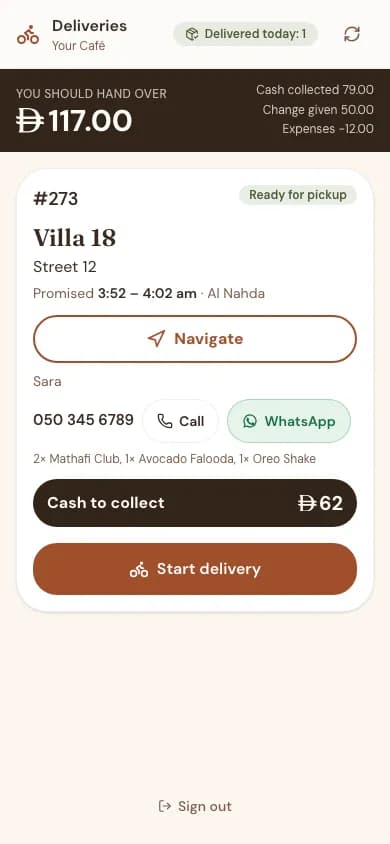
The driver page: Navigate, Call, Delivered
A driver with a login opens the driver page on their own phone and sees only their own orders. Each order shows the address, the area and the customer's phone, with a Navigate button that opens directions and a Call button for when the gate is locked. Start delivery tells the shop and the customer the order is on its way.
Delivered asks one question: how much cash was collected. It is filled with the order total and can be changed for a part payment, or marked as refused with a note. That answer is the record. For a driver without a login, the cashier records Delivered on their behalf.
Driver settlement per shift, with a printed slip
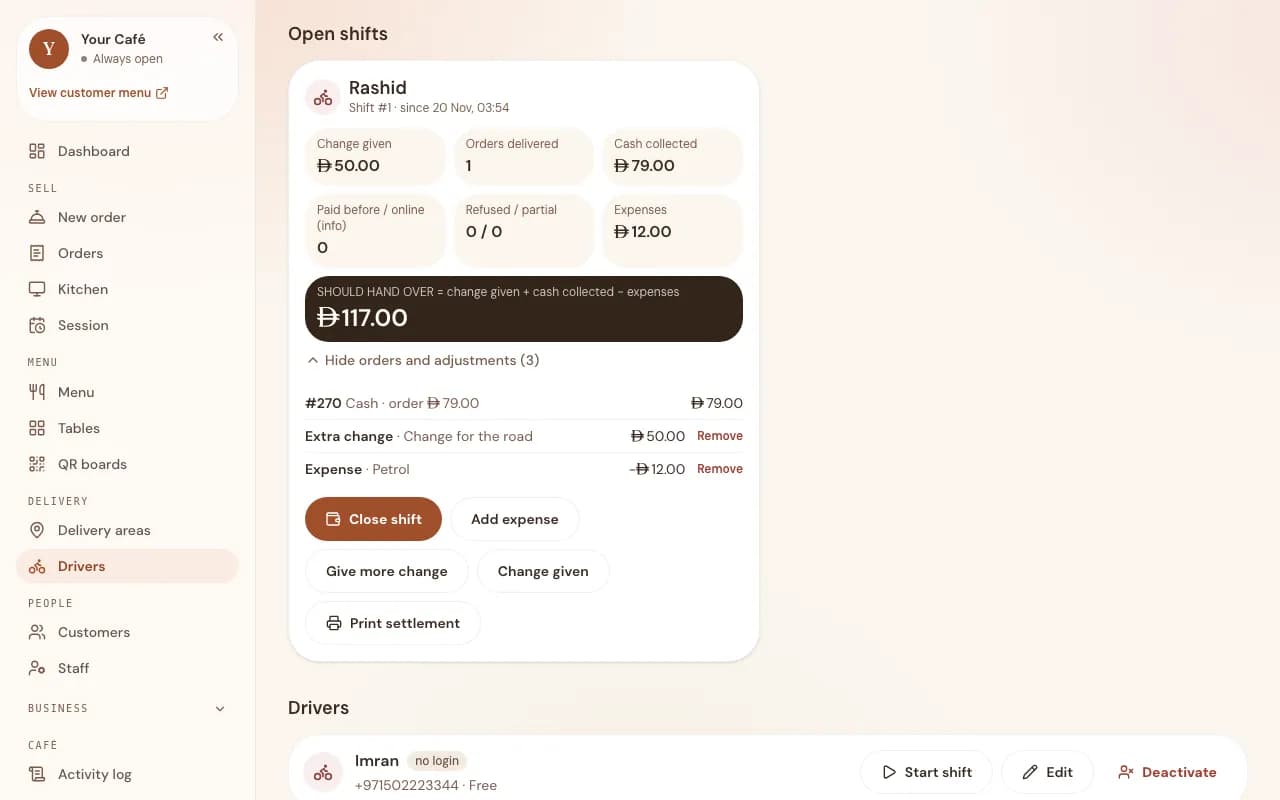
Every driver works in shifts. A shift opens by itself with the first order assigned, or by hand with a cash float. As orders are delivered, each one is added to the shift with what was collected. At the end, Cupcloud shows what the driver should hand over: the float and change given, plus cash collected, minus any expenses on the road.
Count the cash, enter it, and the difference is shown, short or over. Close the shift and print a settlement slip on the receipt printer. A closed shift is locked; only a manager can reopen it, with a reason. At day close, a driver's cash counts in the drawer once that driver has settled, and the close asks about every open shift.
Tracking for the customer, a clear address for the kitchen
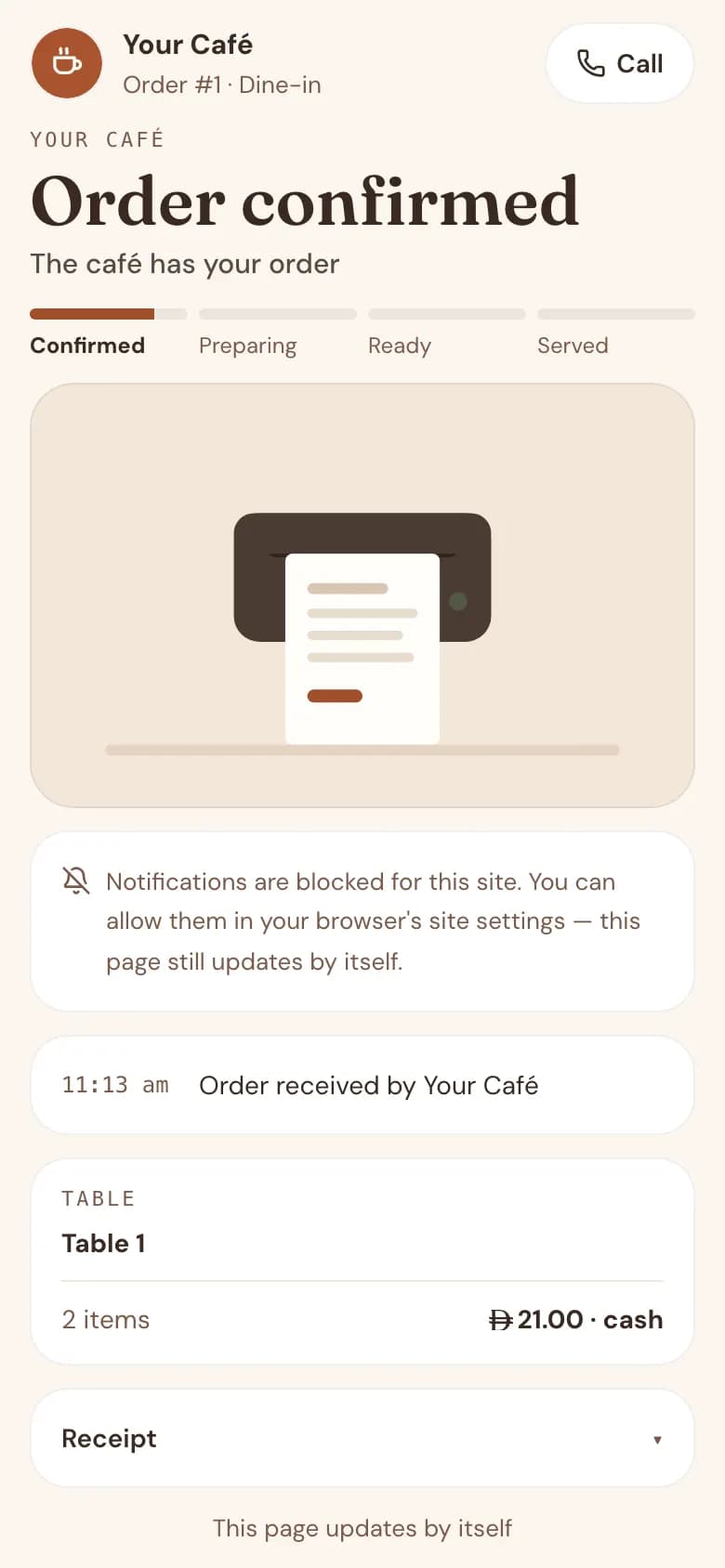
After ordering, the customer gets a live tracking page in your café's name: accepted, preparing, ready, on the way, delivered, with the arrival window. It plays a sound and vibrates when the status changes, and can send browser notifications, so nobody calls the shop to ask where the food is. There is no app to install and Cupcloud sends no SMS or WhatsApp messages.
Inside the shop, the delivery address stands out on the kitchen ticket and the bill in bold, larger text, and the bag label carries it too, so the right bag goes to the right driver. The delivery report shows orders, sales, fees and average delivery time per zone for any date range.
No commission, and the honest limits
Customers pay cash on delivery, or by card online through your café's own payment gateway account, so the money goes straight to you. PayTabs you can connect yourself; N-Genius, Ziina, Mamo, Tap, Stripe, Checkout.com and Telr are set up with our team. Cupcloud never holds your money and takes no commission per order.
What it does not do: Cupcloud supplies no riders, and it does not bring in orders from delivery apps. It is your own delivery channel. Staff can also take delivery orders by phone on the counter POS, finding the customer by mobile and reusing a saved address.
Common questions
Does Cupcloud take a commission on delivery orders?
No. There is no commission per order, and Cupcloud never holds your café's money.
Does Cupcloud provide delivery drivers or riders?
No. You deliver with your own drivers, with or without a login. Cupcloud gives them a driver page and settles their cash per shift.
Can I charge a different delivery fee for each area?
Yes. Each zone you draw has its own fee, minimum order, free-delivery amount and time. The server applies them from the customer's pin.
How do I know how much cash a driver should hand over?
Each delivered order records the cash collected. At the end of the shift Cupcloud shows what the driver should hand over, you enter what was counted, and the slip prints with any difference.
Does it work with Talabat or other delivery apps?
No. Orders from delivery apps are not brought into Cupcloud. It is your own ordering and delivery channel.
How do I start taking delivery orders?
Start with a 14-day free trial, no card needed, or message us on WhatsApp and our team will set up your zones with you. Pricing after the trial is on request.