X report and Z report for restaurants and cafés, with a guided day close
Cupcloud gives restaurants and cafés in the UAE an X report and a Z report: the X report shows the day so far at any time without closing anything, and the Z report closes the day with a guided cash count and a running Z number. Cash, card and online money are shown apart, and the report prints on the café's receipt printer in English or Arabic.
The end of the day should be quick, not an hour with a calculator and a pile of receipts. Too often the drawer is short and nobody can say why: a driver still has cash, a refund was given from the till, or a card payment was rung up as cash. Cupcloud keeps the day's figures as the day happens, so closing is counting the drawer and confirming.
The day opens by itself with the first order
In Cupcloud the café's trading day is a session. Nobody has to remember to open it: if the first order of the morning arrives and no session is open, Cupcloud opens one, so ordering is never blocked. The cashier can then enter the opening cash that is really in the drawer.
There is one open session per café at a time, and every order belongs to the session it was placed in. Manager and cashier can open and close sessions; waiters and drivers do not see them. If you want a nudge, Settings can remind staff when a session is still open at a time you choose.
The X report, any time of day
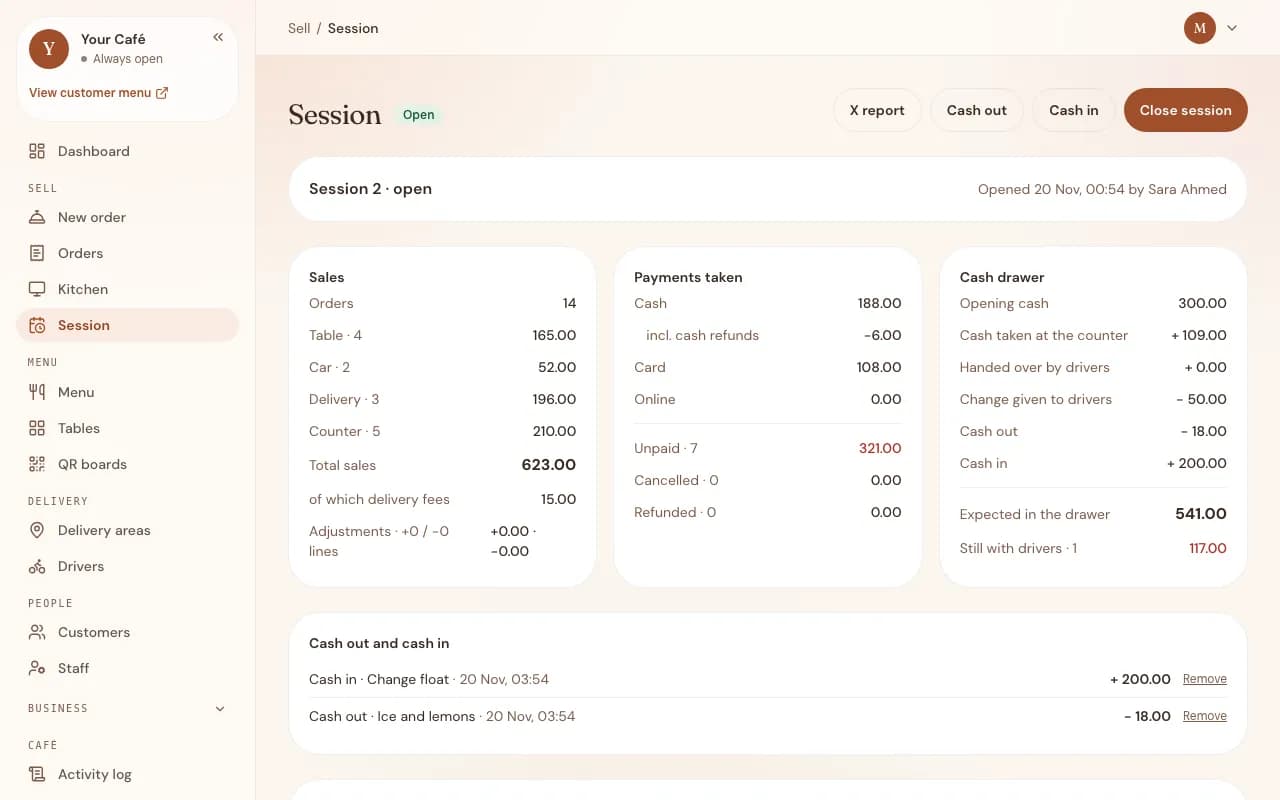
The X report is a snapshot. Open it at lunch, at shift change or before the evening rush, and it shows the day so far without closing or resetting anything.
- Orders and sales by type: table, car, delivery, takeaway and pickup, with delivery fees
- Payments taken in cash, by card and online, with online split by gateway
- Cash and card refunds, and orders still unpaid, cancelled or refunded
- The cash drawer: opening cash, cash taken, cash from drivers, cash out and cash in
- The cash expected in the drawer, and the cash still with drivers
Sales by order, cash by time
This is the one rule that makes the figures add up. A sale belongs to the session in which the order was placed. Money belongs to the session that was open when it was taken.
An example: an order is placed at 11:50 pm and the session closes at midnight with that order carried forward. Its sale is counted in the next session. Or a customer pays tonight for an order from this morning: the sale stays in this morning's session, and the cash counts in the session open when it went into the drawer. So the expected cash is always what should physically be in the drawer right now.
Cash in, cash out and the expected drawer
Money that leaves the drawer for something other than a sale is recorded as cash out, with a note of what it was for, such as ice from the shop. Money put in, such as change from the bank, is cash in. Both are kept with the time and the person who recorded them.
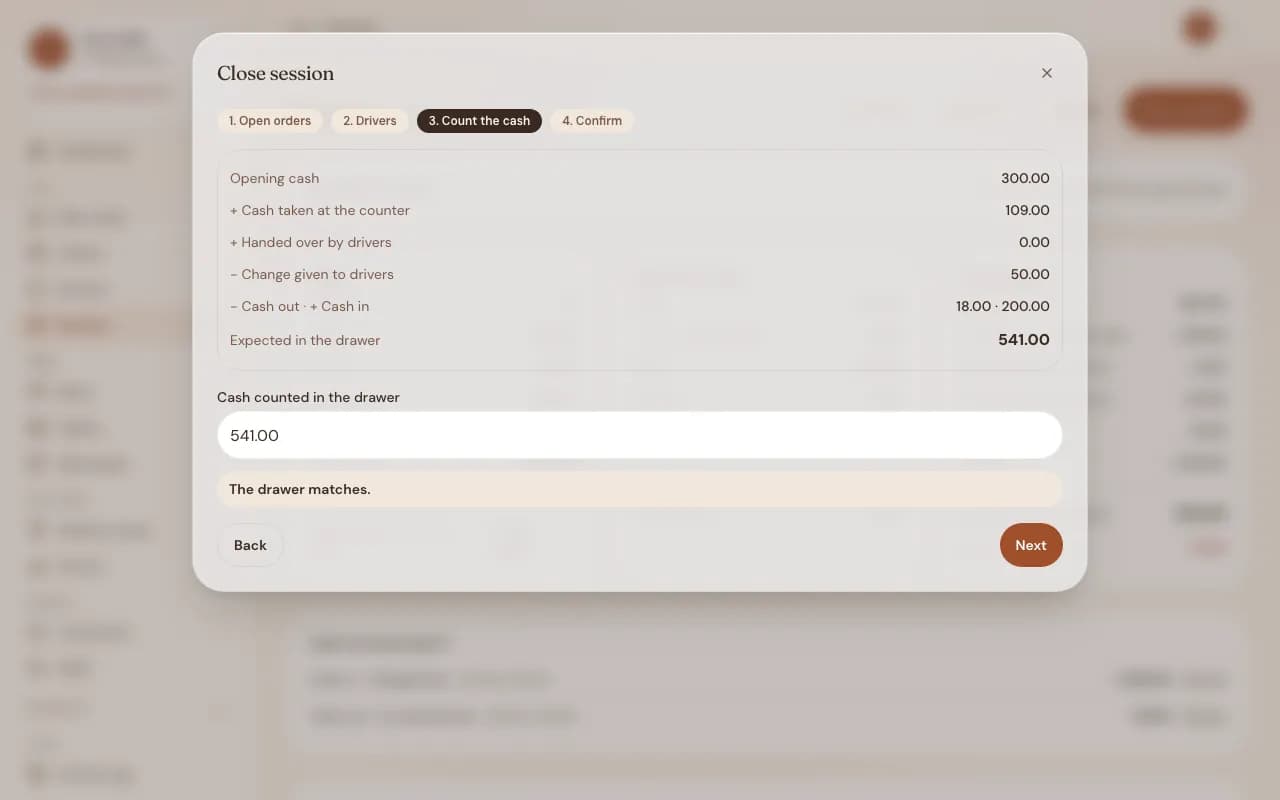
Cupcloud works out the expected cash: opening cash, plus cash taken at the counter, plus cash handed over by drivers, minus change given to drivers, minus cash out, plus cash in, minus cash expenses recorded in the back office. Card and online payments never enter the drawer figure. Only the cash part of a split payment does, and a cash refund comes off it in the session it was given.
The guided Z close
Closing the day is a short guided flow, and it will not let anything slip through. It walks the cashier or manager through four steps and closes everything in one go.
When it is confirmed, the session gets the next Z number for your café, such as Z-0042, and its report is frozen. Orders and driver shifts that were carried go into the next session; they are never rewritten.
- Open orders: finish, cancel or carry each one to the next session
- Drivers: settle each open driver shift now, or carry it
- Count the cash: enter what is in the drawer and see the expected amount next to it
- Confirm: if the drawer is short or over, the difference is shown and a reason is required
Drivers' cash, split payments and refunds
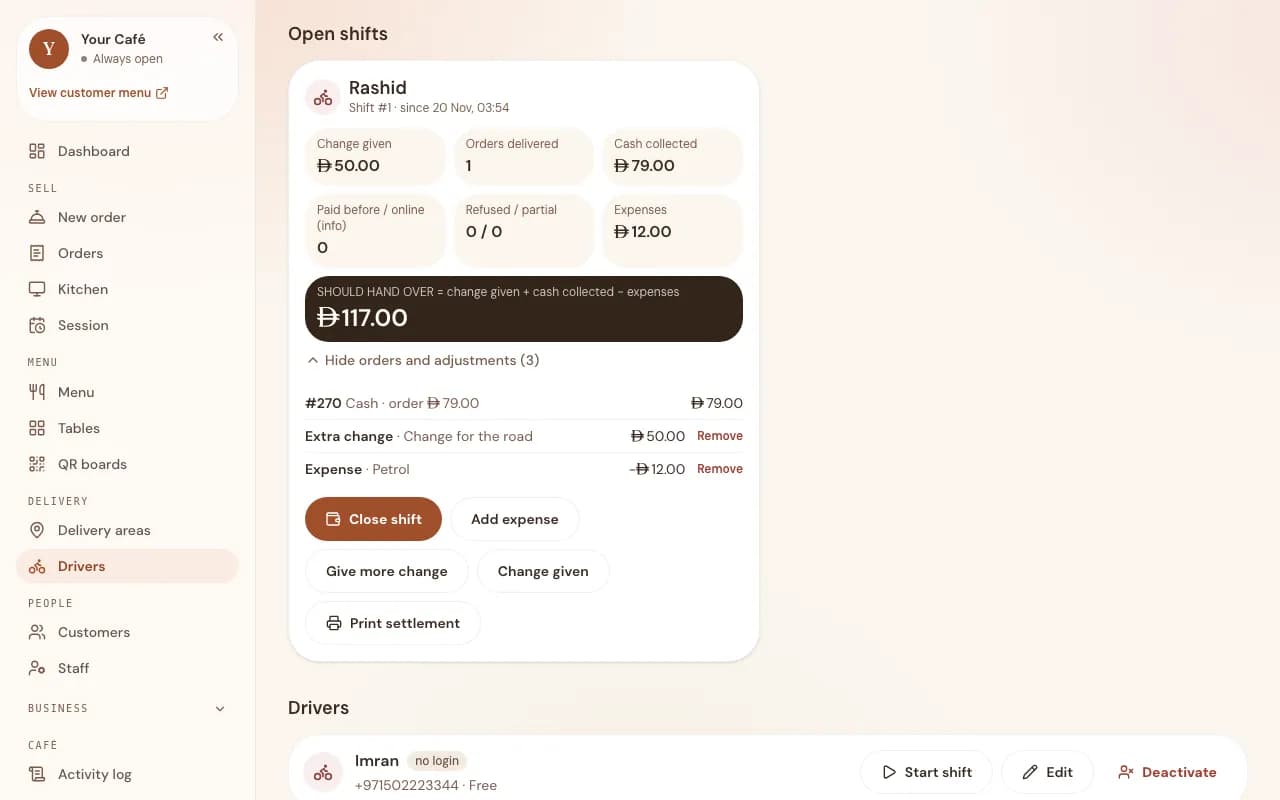
Cash a driver collects on delivery is not in the drawer until the driver hands it over. The X report shows how much is still with drivers, and the close asks for each open driver shift. Settling a shift moves the cash into the drawer figure, and its settlement slip can be printed.
A bill paid part card, part cash is counted per tender: the cash part in cash, the card part in card. Counter refunds come off cash or card in the session they were made, and online refunds are listed by gateway. Nothing is counted twice.
Printing, reopening and the history
Any X or Z report can be printed from the browser, or sent as a slip to the café's receipt printer in English or in Arabic through the print agent.
A closed session is locked. If a mistake is found, only a manager can reopen it, only the last one, and only with a reason; the Z number is kept and the report is marked as reopened. The history lists every session by date with its Z number, expected and counted cash and any difference, totals per day, and exports to CSV for your accountant.
Common questions
What is the difference between an X report and a Z report?
An X report shows the day so far at any time and closes nothing. A Z report is the official day end report: it closes the session after a cash count and gives it a running Z number.
Can we take orders if nobody opened the day?
Yes. Ordering is never blocked: if no session is open when an order arrives, Cupcloud opens one by itself, and the cashier can enter the opening cash afterwards.
What happens if the cash drawer does not match?
The close shows the expected cash next to what was counted, and the difference. If the drawer is short or over, a reason is required before the session can be closed, and it stays on the Z report.
Can a closed Z report be reopened?
Only by a manager, only the last session and only with a reason. The Z number stays the same and the report is marked as reopened.
Can I print the X and Z report on my receipt printer?
Yes. With the print agent on the café's Windows PC, the report prints as a slip on your receipt printer in English or Arabic. It can also be printed from the browser.
Does it link to my accounting software?
No. There is no direct link to accounting software; the session history and reports export to CSV. The day close also needs an internet connection, as offline mode is coming soon.
How do I start, and what does it cost?
Sign up online for a 14-day free trial with no card needed, or message us on WhatsApp and our team will set up your café with you. Pricing after the trial is on request, with no commission per order.