A café POS for the UAE that runs the whole café, from the first order to the Z report
Cupcloud is a café POS made in the UAE that replaces a separate till: it takes orders from table QR codes, cars, delivery, the phone and the counter, sends them to the kitchen, takes payment and closes the day with an X and Z report. It is built for cafés, cafeterias, karak shops, small restaurants and cloud kitchens, in English and Arabic, with prices in AED and UAE VAT.
Most cafés end up with a till for the counter, a separate QR menu, a notebook for phone orders and a calculator for the end of the day. None of them talk to each other, so the same order is typed twice and the cash never quite matches. Cupcloud puts all of it on one menu, one order queue and one set of figures, and, as a cloud POS, it runs in the browser on a tablet or computer you already have.
One system instead of a till plus everything else
A café POS used to mean a box at the counter that rings up sales. In a UAE café that is only half the work. Customers order from the table, from the car outside, by phone for delivery and at the counter, and every one of those orders has to reach the kitchen, be paid for and end up in the day's figures.
Cupcloud is the counter POS and everything around it. Your menu is entered once and used everywhere: on the customer's phone, on the counter screen, on the kitchen ticket and in the reports. Change a price or mark an item sold out, and every screen follows. There is no second system to keep in step.
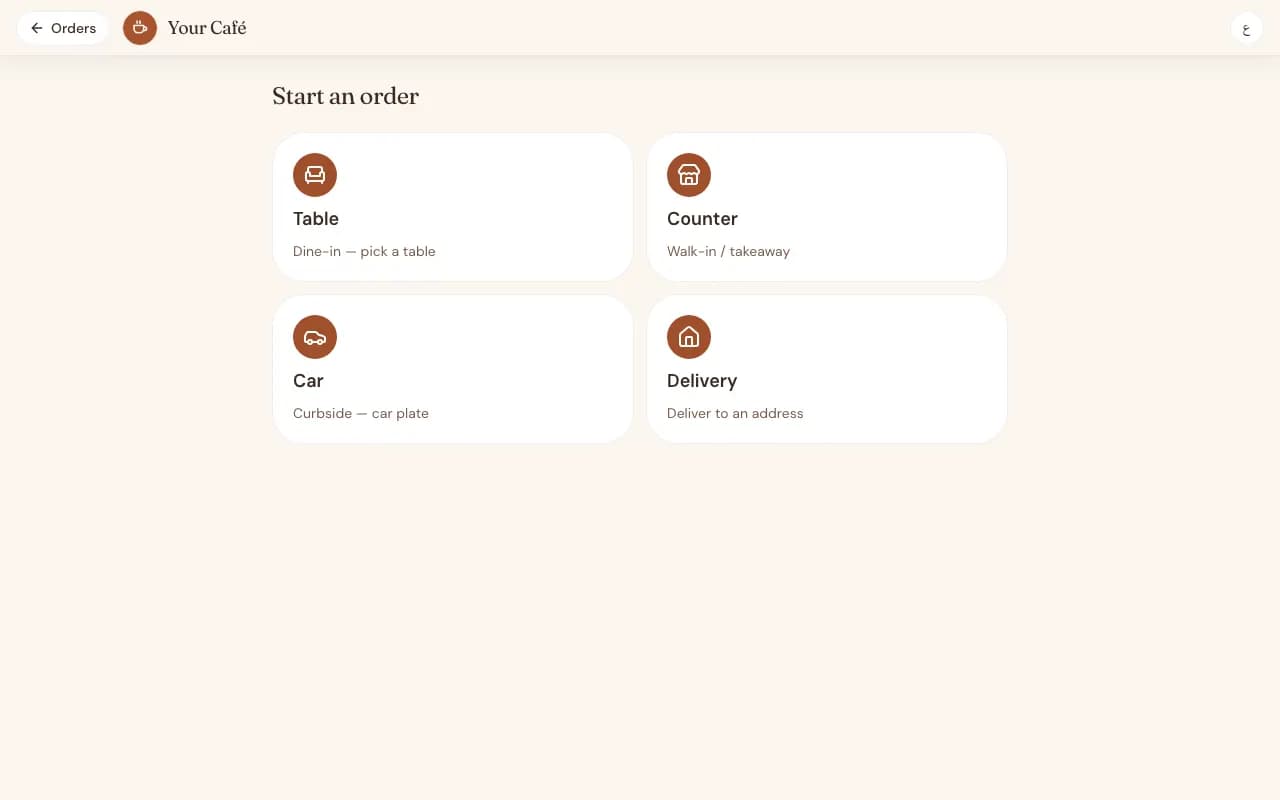
How an order moves through Cupcloud
Every order follows the same path, whoever starts it. Here is a normal one: a customer in a car outside a Sharjah cafeteria orders two karak and a chicken paratha.
- The customer scans the QR code on your car-park board, picks the items in Arabic or English, and enters the plate, emirate and mobile
- The order appears in the staff order queue and keeps ringing until someone accepts it
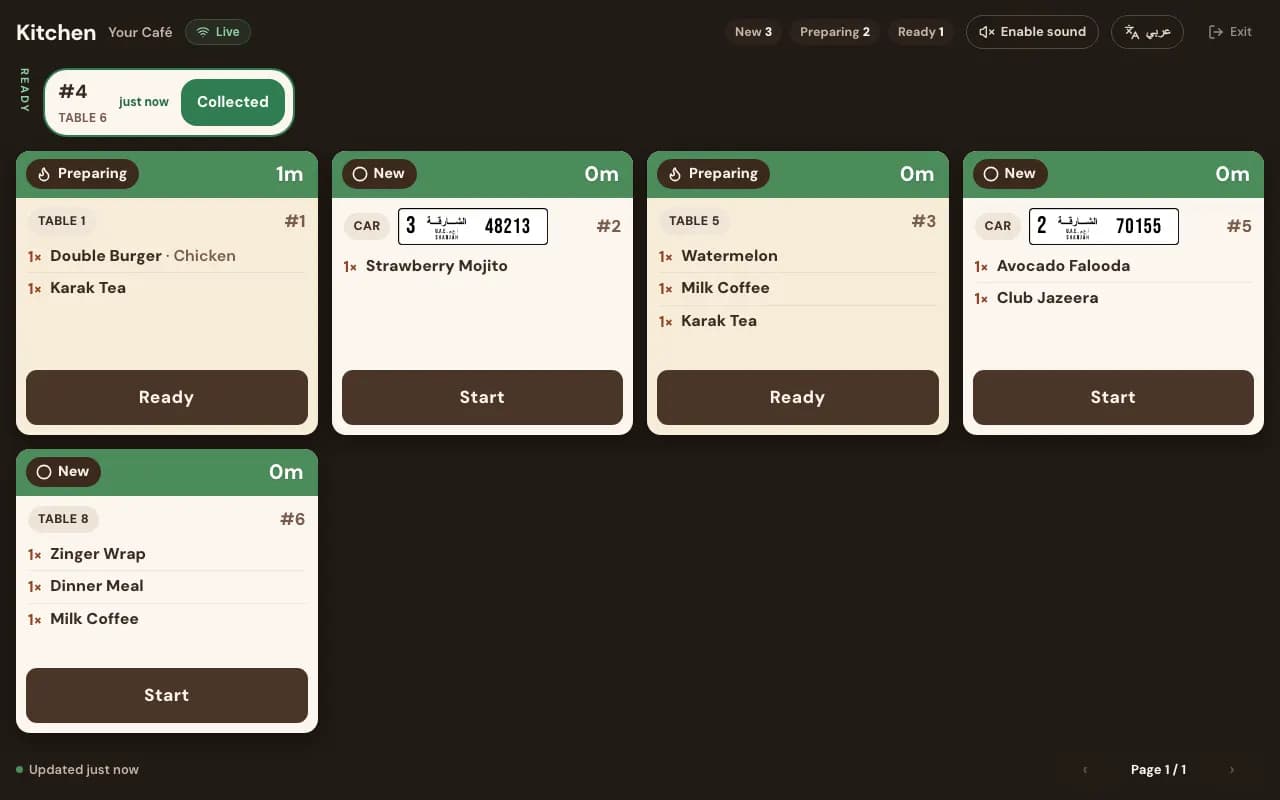
- The kitchen ticket prints on the café's printer, or the order shows on the kitchen screen, with an item label for each piece if you use labels
- Staff mark it ready and carry it to that car; the customer's tracking page updates as it goes
- Payment is taken in cash or on your card machine at the car, or was already paid online through your own gateway
- At night the order is in the session's sales, the cash is in the expected drawer total, and the Z report closes the day
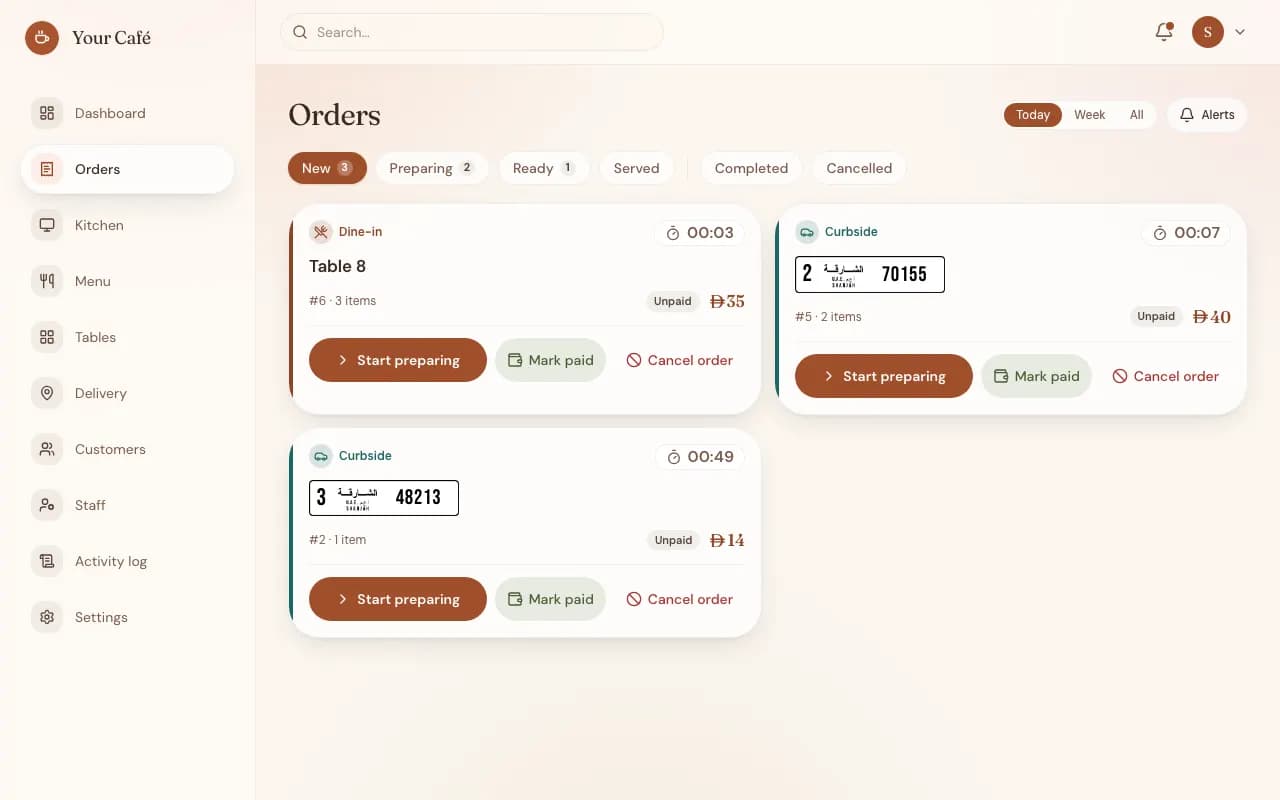
The counter screen your cashier actually uses
The order screen opens on Takeaway, ready to sell. One tap adds an item; only items with a size or a required choice open a picker. The table, the car plate, a phone caller or a delivery address can be added before or after the items, and Place order tells the cashier exactly what is still missing.
Cashiers can browse by category with item photos, see every item in one list, or use a photo layout for waiters. Search works in English and Arabic, forgives a typo, and takes short codes you give your items. An order can be split by person so each part is paid on its own, and the payment dialog handles cash with change, your card machine, and part card, part cash on one bill.
- Three views: Categories, All items and Photos, remembered per person and device
- English or Arabic on the order screen, one language per screen
- Phone orders: find a caller by mobile, pick a saved address, repeat the last order
- Price adjustments only for the staff you allow
- Breakfast or evening items sold only in their hours
Kitchen screen, kitchen tickets and item labels
Orders reach the kitchen the way your kitchen works. A screen in the kitchen shows each ticket with a timer and a sound. Or a print agent on the café's Windows PC prints a kitchen ticket (KOT) on your thermal printer the moment the order is placed, and a bill for the customer when you need one.
For takeaway, car and delivery orders, Cupcloud can print one label per piece, so every cup in the bag says what it is and which order it belongs to. Thermal receipt printers, label printers and Zebra label printers are supported, and every order shows whether its ticket has printed.
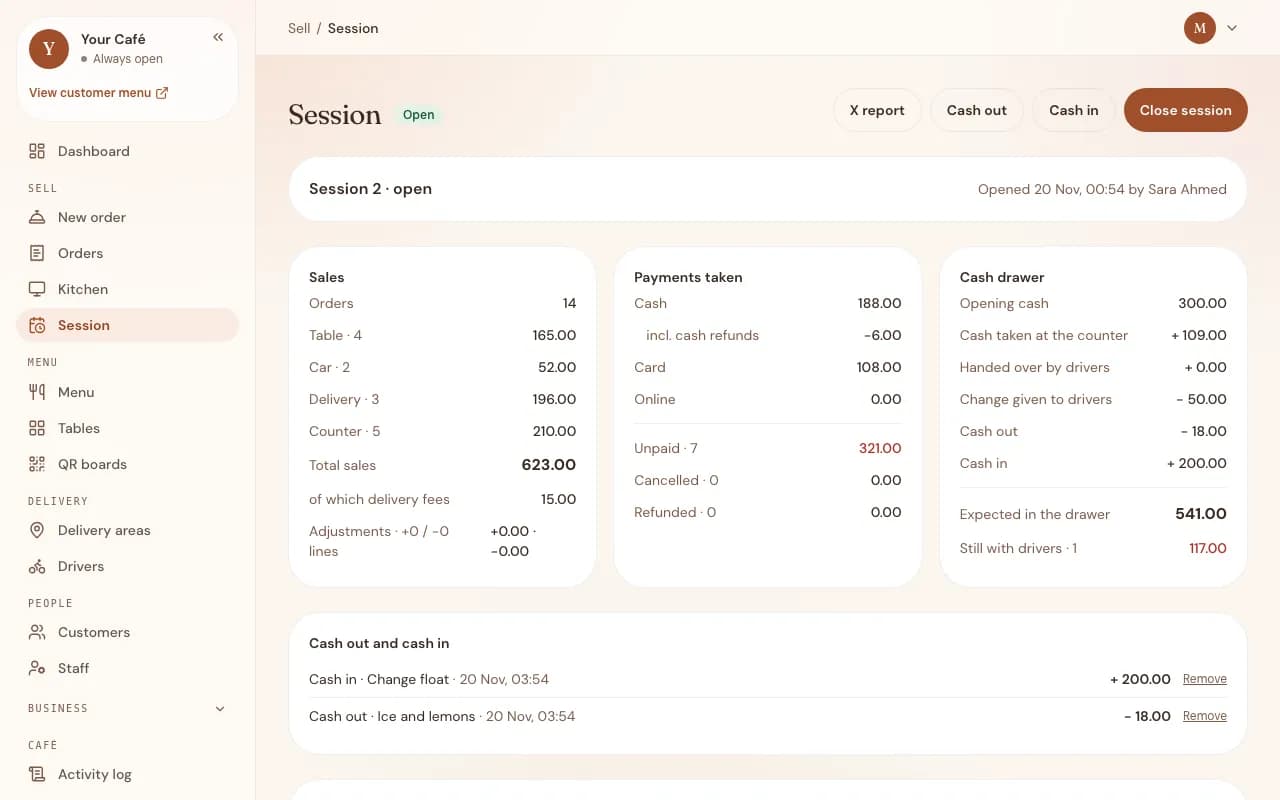
Payments, VAT and the end of the day
Money is recorded where it is taken. Cash and the café's own card machine are recorded at the counter, a bill can be split part card, part cash, and a manager can refund a counter payment with a reason. Online card payments go through your own gateway account: PayTabs you can connect yourself, and N-Genius, Ziina, Mamo, Tap, Stripe, Checkout.com and Telr are set up with our team. The money goes straight to your account, and Cupcloud takes no commission on any order.
VAT is worked out on every order at your café's rate, which is 5% in the UAE, and prices can be shown as the customer pays them. A session opens by itself with the first order, the X report shows the day so far, and the guided Z close counts the drawer and gives the day a number. Reports, including a VAT summary and profit and loss, export to CSV.
What a café needs to run Cupcloud
Cupcloud is a cloud POS for the UAE: it runs in a web browser on a tablet or computer, so there is no special terminal to buy and nothing to install on the till; printing uses a small print program on a Windows PC in the café. The counter can be a touch till, a laptop or a tablet; the order screen works on wide tills down to a phone. A kitchen screen is any screen with a browser.
Printing is the one part that needs a Windows PC in the café, because the print agent runs there and sends tickets, bills, labels and day-close slips to your printers. Card payments at the counter are taken on the card machine you already have from your bank and recorded in Cupcloud. You need a steady internet connection; offline mode is coming soon, not available yet.
- A till, laptop, tablet or phone with a browser for the counter
- Optional: a screen in the kitchen, or a Windows PC with a thermal printer for kitchen tickets and bills
- Optional: a label printer for item labels on takeaway, car and delivery orders
- Your own card machine for card payments at the counter
Who it suits, in English and Arabic
Cupcloud is made for the way food is sold in the UAE: specialty cafés, cafeterias and karak shops with car service, juice and sweet shops, shawarma and grill counters, small restaurants and cloud kitchens that live on delivery. A small shop can run on one tablet by the tea station; a busier café can add a kitchen screen, printers and drivers.
Everything a customer sees is in real right-to-left Arabic and in English, and staff can run the order screen in either language. The manager's admin screens are in English for now. Prices are in AED, plates carry their emirate, and help is on WhatsApp.
Every part of the system
Open any part to see how it works.
- Customers orderDigital menuYour own bilingual menu site with photos, sizes, add-ons and sold-out items.
- Customers orderQR table orderingA QR on every table; orders arrive with the table number.
- Customers orderCar ordersCustomers order from the car with their plate; staff walk to the right car.
- Customers orderDelivery and driversYour zones and fees on a map, your own drivers, cash settled per shift.
- Customers orderOnline ordering, no commissionOrders on your own site with a live tracking page — no commission per order.
- Customers orderArabic and EnglishEvery screen customers see in real right-to-left Arabic and in English.
- At the counterCounter POSSell at the counter in a few taps: categories, search, codes, split by person.
- At the counterPhone ordersFind a caller by mobile, pick a saved address, repeat the last order.
- At the counterTimed menusBreakfast, lunch and evening items sell only in their hours, on every screen.
- In the kitchenKitchen screen and printingKitchen screen, kitchen tickets, bills and one label per item — Zebra too.
- MoneyPayments and refundsCash with change, card, card + cash on one bill, refunds, and online payment to you.
- MoneyDay close (X and Z)An X report any time and a guided Z close with the cash count.
- Running the caféBack officeSuppliers and bills, expenses, rent cheques, staff advances and payroll.
- Running the caféReports and VATTwelve reports from daily closing to profit and loss and the VAT summary.
- Running the caféQR boardsPrint car-park boards and table stands in English and Arabic with your logo.
Who it is for
What Cupcloud does not do (yet)
- No Talabat, Deliveroo, Noon Food, Careem or Keeta integration — delivery-app orders are not brought into Cupcloud. Cupcloud is your own ordering channel.
- No inventory or recipe stock — selling an item does not deduct ingredients; purchase bills record what you spend, not stock levels.
- No loyalty points or stamp cards yet.
- No offline mode yet — the counter needs an internet connection (offline mode is coming).
- No built-in card terminal — card at the counter is taken on your own machine and recorded in Cupcloud.
- No riders — you deliver with your own drivers.
- No link to accounting software (Xero, QuickBooks, Zoho) — reports export as CSV.
- No table reservations, and no automatic SMS or WhatsApp messages to customers — updates go through the tracking page and notifications.
What we are building next
No dates yet — we will say when each one is ready.
- Coming soonOffline modeKeep taking orders at the counter when the internet drops.
- Coming soonThe owner appSales, alerts and the day close on the owner's phone.
Common questions
How do I choose a café POS in the UAE?
Look at how your orders really arrive. If you take car, table, phone or delivery orders as well as counter sales, choose a system where they all reach one queue and one set of figures, with English and Arabic and UAE VAT built in. That is what Cupcloud is built for.
Is Cupcloud a cloud POS, or do I need special POS hardware?
Cupcloud is a cloud POS, so no special hardware and nothing to install on the till: it runs in a browser on a till, laptop, tablet or phone. Printing uses a small print program on a Windows PC in the café, so you only need that PC if you want to print kitchen tickets, bills or labels; and card payments use your own card machine.
Does the café POS work in Arabic?
Yes. The customer menu, checkout and tracking page are in Arabic and English, and the counter order screen can be used in either. The manager's admin screens are in English for now.
Does Cupcloud handle UAE VAT?
Yes. VAT is calculated on every order at your café's rate, prices can be shown VAT-inclusive, and the VAT summary report gives the totals for any date range.
Does Cupcloud take a commission on orders?
No. Cupcloud takes no commission on any order. Online payments go through your own gateway account and the money goes straight to you.
Is there anything Cupcloud does not do?
Yes. It does not bring in orders from delivery apps, it has no inventory or recipe stock and no loyalty points yet, and it needs an internet connection; offline mode is coming soon.
How much does Cupcloud cost, and how do I start?
Sign up online for a 14-day free trial with no card needed, or message us on WhatsApp and our team will set your café up with you. Pricing after the trial is on request, and there is no commission per order.