A kitchen display system for UAE cafés, with KOT printing and item labels
Cupcloud's kitchen display system is a kitchen screen and a printing setup for cafés, cafeterias and small restaurants in the UAE. Every order, from the table, the car, delivery or the counter, reaches the kitchen screen with a sound and can print a kitchen ticket (KOT), a bill and one label per item on the café's own printers. It runs in a browser, and printing goes through a small agent on the café's Windows PC.
The order is taken, the money is in, and then it gets lost between the counter and the kitchen. A paper slip falls behind the grill, nobody hears the tablet, and five identical karak cups leave on the wrong tray. Cupcloud keeps one order moving from the moment it is placed until it is in the customer's hand: a screen the kitchen can read from across the room, tickets that print by themselves, and a label on every cup and box.
A kitchen screen that shows what to make next
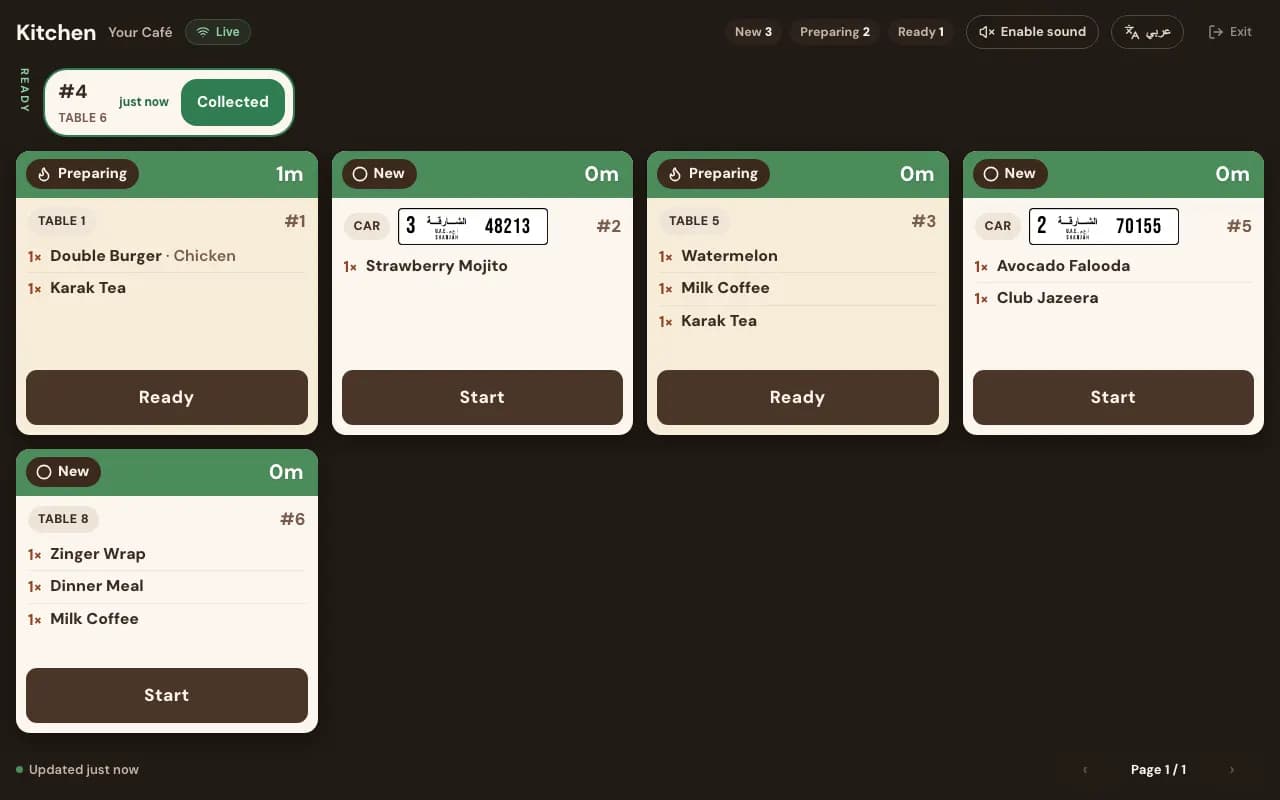
The kitchen screen is a view of the same live order list the counter uses, made for a screen on the kitchen wall. Each ticket shows the order number, the way it was ordered (table, car with its plate, delivery, takeaway), every item with its size and options, and any special request marked so it cannot be missed.
Each ticket carries a wait timer. Its header band changes colour as the order ages, with different limits for counter, car and delivery orders, so a late ticket stands out without the whole screen turning red. One tap moves a ticket on, and ready orders step out of the grid into a short rail so the board stays readable on a busy evening.
The kitchen screen rings for every new ticket, whoever entered it. If the café wants, it can also show the customer's phone number, so the kitchen can call about a missing item without walking to the counter.
Order alerts that ring until someone answers
A new order should behave like a telephone. On the counter, a new order placed by a customer rings every few seconds until someone accepts or opens it, and after two minutes the sound gets faster and louder. Silence quiets what is ringing now, but the next order rings again, so the counter cannot be muted by mistake.
Car and delivery orders have their own horn sound, so staff know what is coming before they look. The browser tab also shows the count of waiting orders, and a manager's or cashier's phone can get a push notification for a new customer order when no screen is open.
Browsers need one tap on the page before they may play sound, so the screen shows a bright bar until someone taps it. It never claims the sound is on when the browser is blocking it.
The print agent on your café's PC
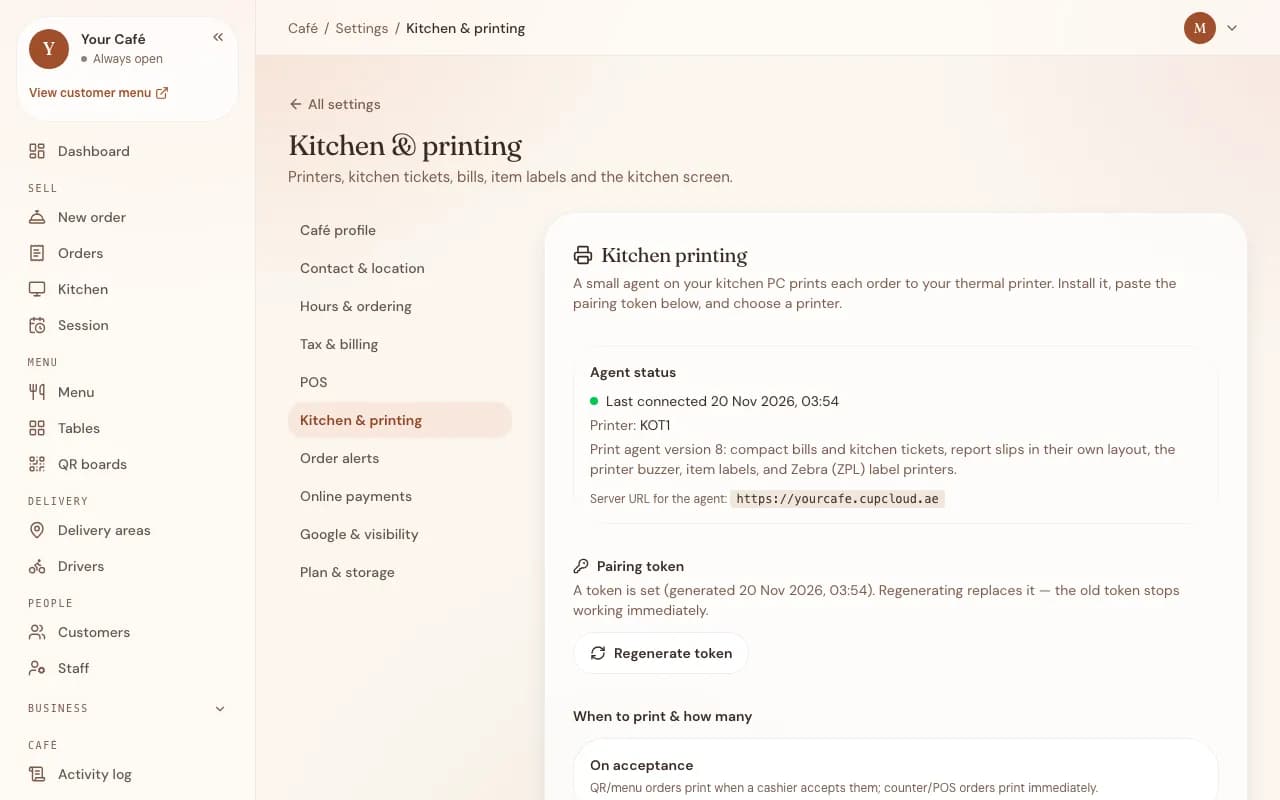
A browser cannot reach a printer on its own, so Cupcloud uses a small print agent that runs on the café's Windows PC. It connects out to Cupcloud, collects the café's print jobs and sends them to the printers already plugged into that PC or on the shop's network. No ports to open, no router settings, and no new cloud printer to buy.
The agent is paired with your café once, using a code from Settings. It keeps working through a printer that is switched off or a short internet drop, and prints the waiting jobs when it is back.
- Kitchen tickets print automatically, when the order is accepted, or only when staff press Print
- Choose how many copies of the kitchen ticket you want
- Send the kitchen ticket and the bill to different printers if you have two
- An optional printer buzzer beeps when a new order's kitchen ticket prints
Kitchen ticket and a compact bill
The kitchen ticket (KOT) starts at the order number, with the order type and the car plate on one line and the items in large print. When an order is split by person at the counter, each item is tagged with its part, for example "2 Ahmed", so the kitchen can plate it the right way. If an order is edited or cancelled after it reached the kitchen, an amendment or cancel slip prints so nobody cooks from an old ticket.
The bill is compact and easy to read. Item names print in English, Arabic or both, as the café chooses. A cash payment shows the cash received and the change, and a payment split between card and cash shows each part (these two need the current version of the print agent). With a TRN, the bill is titled as a tax invoice and shows the VAT; a delivery address prints large and bold so the driver cannot misread it.
Item labels: one label per cup, box and bag
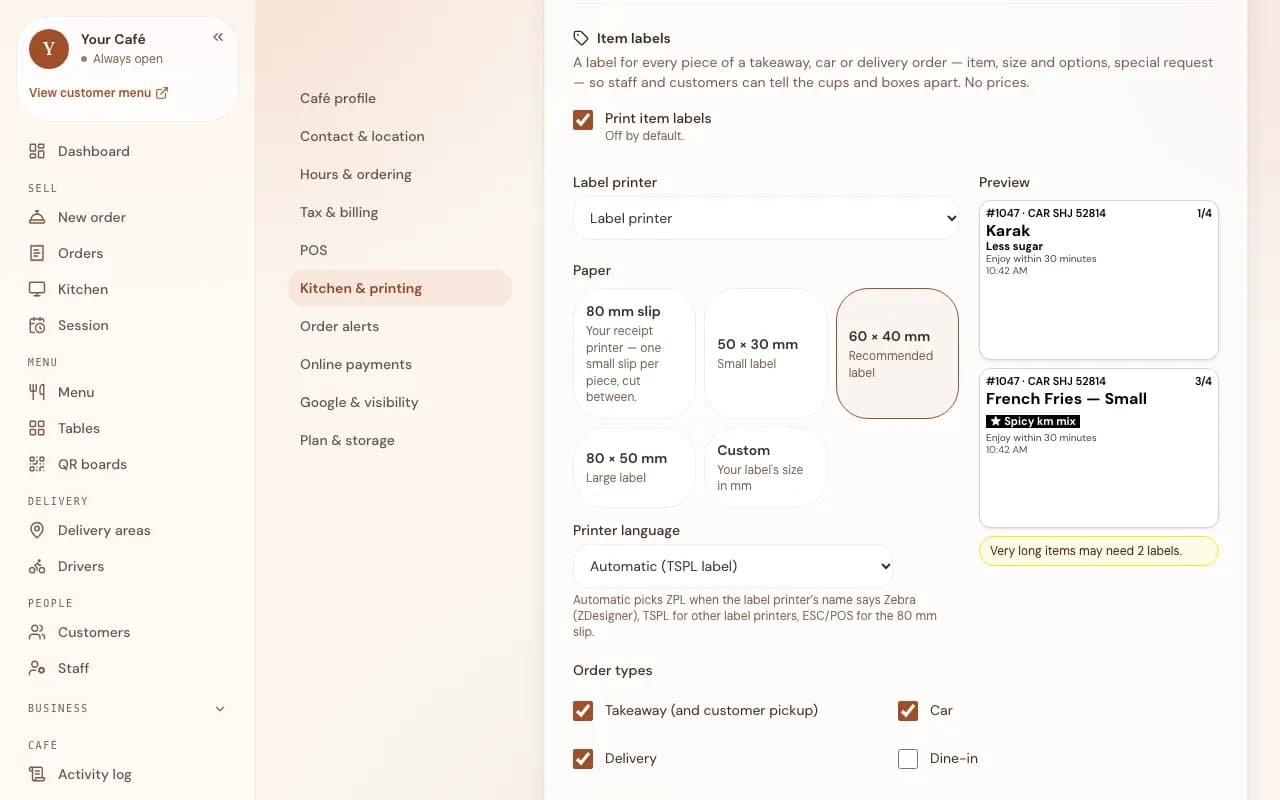
For takeaway, car and delivery orders, Cupcloud can print one label for every piece. Three karak and two sandwiches give five labels, numbered 1/5 to 5/5, so staff know when an order is complete. Each label shows the order number and type (with the car plate), the item and its size, the options that differ from normal, the special request and the time. Labels never show prices.
You can add a short instruction line to every label, in English and Arabic, and choose whether the label shows the order time or the time it was printed. An optional bag label sums up the order: the plate or the delivery address, the customer and the number of items. Pick the label size (an 80 mm slip, 50×30, 60×40, 80×50 mm or a custom size), the order types and the categories that get labels, and check the preview before you save.
Printers that work: thermal receipts, TSPL and Zebra
Kitchen tickets, bills and slips print on standard 80 mm or 58 mm thermal receipt printers that speak ESC/POS, the kind most UAE cafés already own. Item labels print on TSPL label printers, on Zebra label printers using ZPL, or on the receipt printer as a long slip.
Leave the printer language on Automatic and Cupcloud picks it from the printer's name: a printer named Zebra gets ZPL, other label printers get TSPL. If a label printer cuts off an edge, you can move the print by half a millimetre at a time from Settings, without touching the printer's own setup.
Print status on every order, reprint, and the day's slips
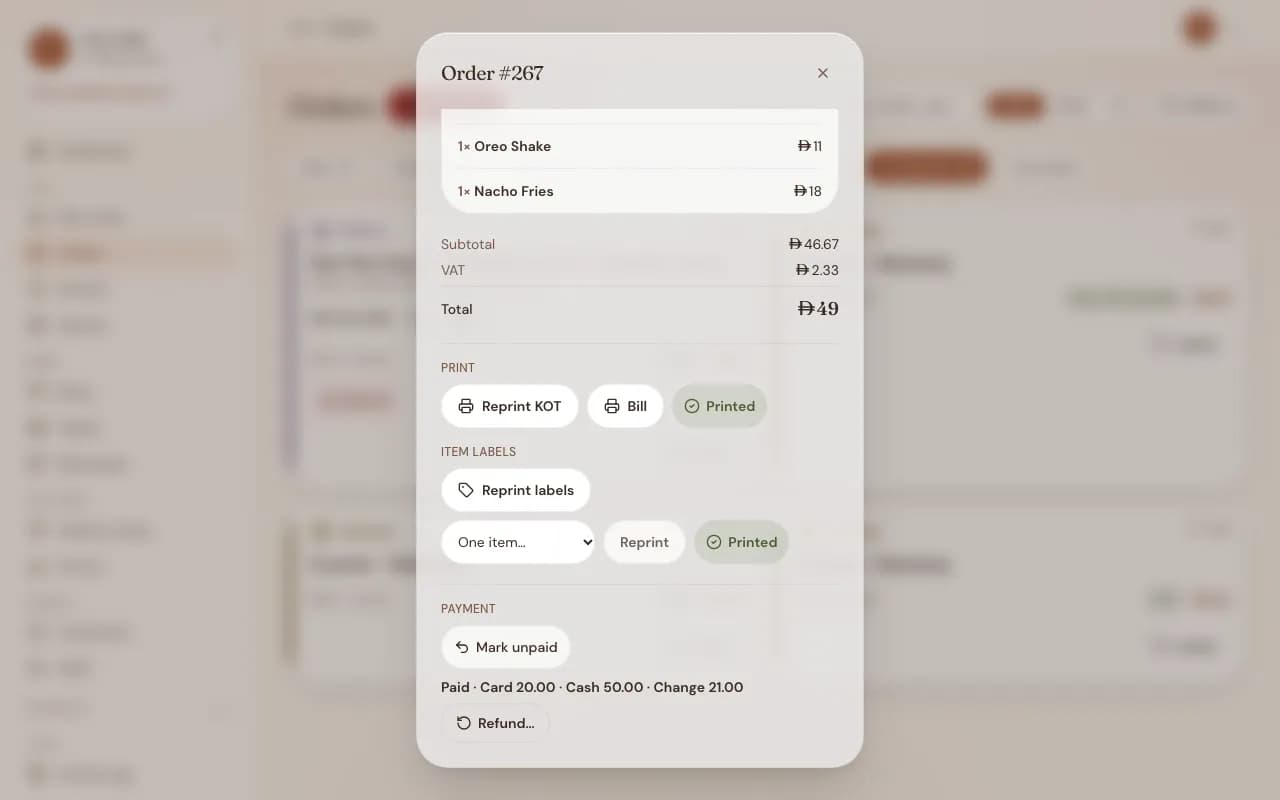
Every order shows whether its kitchen ticket, bill and labels printed, or did not. If a job has been waiting too long, the order says it was not printed, and staff can check that the print agent is running. Reprint the kitchen ticket or the bill with one tap, and reprint all the labels of an order or just one item's.
The same printer handles the end of the day: the X report during the day, the Z report when you close, and each driver's settlement slip with the cash they brought back.
Common questions
Do I need a kitchen screen or a kitchen printer?
Neither is required. A small shop can work from the order queue on one tablet; add a kitchen screen, a kitchen ticket printer, labels, or all three as you grow.
Which KOT printer and label printer can I use?
Any 80 mm or 58 mm thermal receipt printer that speaks ESC/POS for tickets and bills, and a TSPL or Zebra (ZPL) label printer for item labels. The print agent runs on a Windows PC that the printers are connected to.
Does it work with Zebra label printers?
Yes. Zebra printers use ZPL, and Cupcloud sends ZPL to a printer whose name says Zebra, or when you choose it in Settings.
Can the grill and the barista get separate tickets?
Not yet. The whole order prints on one kitchen ticket, with as many copies as you choose; the bill can go to a different printer. The kitchen screen also shows the whole order.
What happens if the internet drops?
The print agent prints waiting jobs when the connection comes back, but taking new orders needs the internet today. An offline mode is coming soon.
How do I start, and what does it cost?
Sign up online for a 14-day free trial, no card needed, or message us on WhatsApp and our team will set it up with you. Pricing after the trial is on request, and there is no commission on orders.